
About the Author
I’m an infrastructure engineer and architect with nearly three decades of experience in enterprise IT. Over the years, my work has spanned virtualization, end-user computing, Azure Virtual Desktop, automation, and endpoint technologies, with IGEL becoming an increasingly important part of that journey.
More about Jason and Tall Grass Compute →
I’m proud to be a member of the inaugural 2026 IGEL Technology Professional (ITP) class. The IGEL Technology Professional Program is IGEL’s top-tier technical recognition program, bringing together endpoint, EUC, and security experts who create and share original technical content, exchange knowledge, and help others solve real-world technical challenges.
That philosophy is also a big part of Tall Grass Compute, my personal homelab and technical playground. It gives me a place to build things, test things, break things, occasionally destroy things, understand why they broke, automate them, and then share what I learned.
This article grew directly out of that process. What started as an attempt to eliminate a manual certificate-renewal task became a much more interesting exploration of certificate lifecycle management, automation, security boundaries, idempotency, and verifying that the system actually did what the automation said it did.
Project Overview
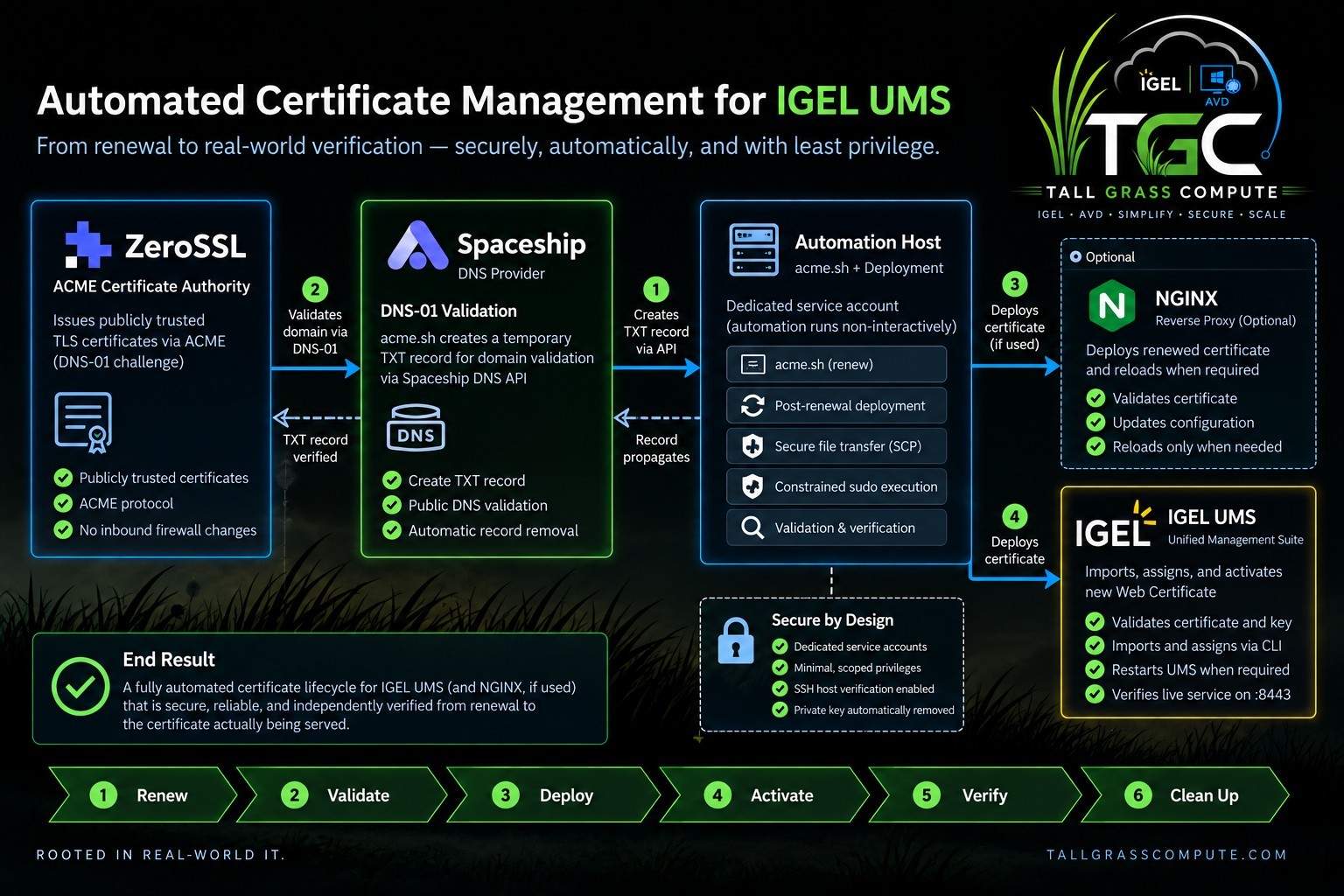
Public certificate renewal is the easy part. Modern ACME clients can obtain and renew certificates with very little human involvement. The harder question is what happens after the renewed certificate exists: how does it get into IGEL UMS securely, how do we activate it, and how do we prove that the running service is actually presenting it?
This project started with a simple goal: automate renewal of a public Web Certificate for IGEL UMS. It ended up becoming a complete certificate lifecycle with validation, least-privilege deployment, runtime verification, cleanup, and idempotency.
The goal is not merely to renew a certificate. The goal is to automate the entire lifecycle.
1. The Problem We're Solving
IGEL UMS uses Web Certificates for communication over the Web Port, which defaults to TCP 8443. IGEL documents that this port is used for web-facing UMS services and related communication, so certificate management here is broader than simply avoiding a browser warning.
ACME solves issuance and renewal. But a renewed certificate sitting on an automation server does not help UMS. The real lifecycle is:
Renew -> Validate -> Deploy -> Activate -> Verify -> Clean Up
That distinction became the central theme of this project: a successful certificate renewal is not necessarily a successful certificate deployment.
2. What We're Building
The lab uses ZeroSSL as the ACME certificate authority, Spaceship as the DNS provider, and acme.sh as the ACME client. A Linux automation host runs acme.sh and also happens to run NGINX. The UMS Server is a separate Linux host.
acme.sh handles certificate issuance and renewal. The custom automation described here begins where normal certificate renewal ends: securely deploying the renewed certificate into IGEL UMS and verifying the result.
NGINX is shown because the same renewed certificate is also consumed locally by NGINX in this lab. It is an optional branch of this implementation, not a dependency of the UMS workflow.
That separation is useful when adapting the design elsewhere. An environment that does not use NGINX can omit that branch without changing the UMS portion of the workflow. Likewise, the ACME certificate authority or DNS provider can change while the post-renewal UMS deployment pattern remains largely the same. The lab values in this article are concrete because they were tested, but the architecture is deliberately modular.
The end-to-end path is intentionally broader than certificate issuance. After DNS-01 validation and renewal succeed, the renewed certificate becomes input to a deployment workflow that validates the material, crosses the UMS privilege boundary through a constrained service account, imports and assigns the certificate, verifies the running HTTPS listener, and removes the staged private key. In other words, renewal is the trigger; deployment and verification are the actual objective.
One of the design goals was to keep certificate issuance separate from certificate consumption. acme.sh is responsible for obtaining and renewing the certificate; it does not need to understand how IGEL UMS imports or activates one. Likewise, the UMS deployment logic does not need to know how the certificate was issued. It receives certificate material, validates it, and brings UMS to the expected state.
That separation also keeps the workflow extensible without making the UMS deployment path more complicated. A dedicated certificate host could perform the same handoff, and additional certificate consumers could be added alongside UMS. The important boundary stays the same: the ACME client produces renewed certificate material, while each consumer-specific deployment step is responsible for safely applying and verifying it.
3. A Quick ACME and DNS-01 Primer
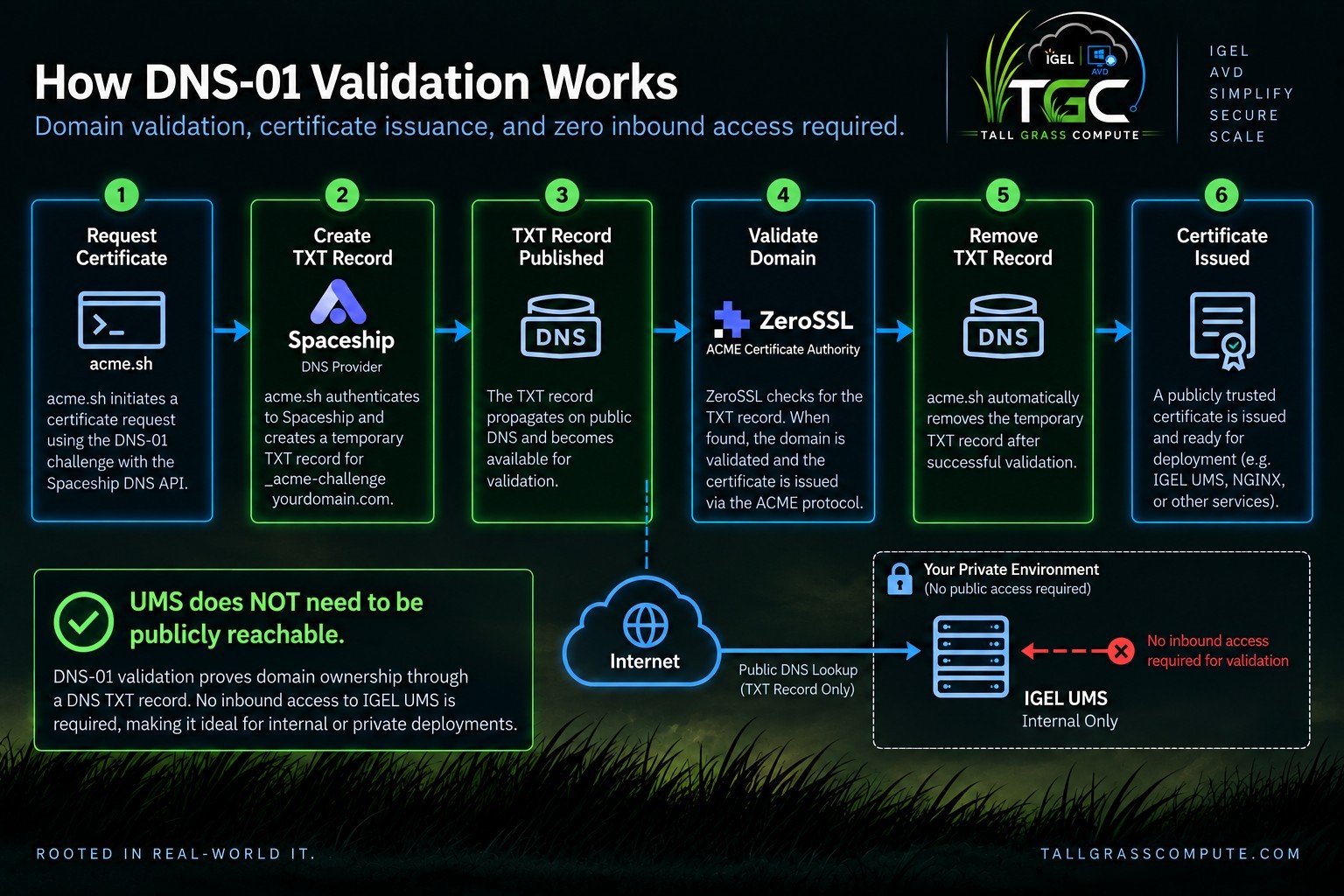
With DNS-01 validation, the ACME client asks the DNS provider to publish a temporary TXT record under _acme-challenge for the requested name. The certificate authority queries public DNS, verifies the challenge value, and then issues the certificate. The TXT record can then be removed.
The important architectural advantage is that validation happens through DNS. The UMS Server does not need a public inbound path just so a certificate authority can validate the hostname.
4. Lab Environment and Prerequisites
The tested implementation uses a Linux certificate/NGINX automation host, a Linux IGEL UMS Server, a public DNS name for UMS, ZeroSSL, Spaceship DNS API access, OpenSSL, SSH, and the IGEL UMS Administrator CLI.
The final design also uses two dedicated service identities: acme on the automation host and ums- cert-deploy on the UMS Server. Privileged operations are deliberately isolated behind root-owned wrapper scripts rather than giving either service account unrestricted sudo access.
5. Obtaining the Certificate
Certificate issuance runs under the dedicated acme service account. In the lab, acme.sh is installed under /home/acme/.acme.sh and registered with ZeroSSL.
/home/acme/.acme.sh/acme.sh \
--register-account \
--server zerossl \
-m administrator@example.com
Spaceship API credentials are stored in the acme account configuration and used by the dns_spaceship integration. The UMS certificate is issued with an RSA 2048-bit key:
/home/acme/.acme.sh/acme.sh \
--issue \
--dns dns_spaceship \
-d ums.example.com \
--server zerossl \
--keylength 2048
After issuance, acme.sh manages the leaf certificate, private key, intermediate certificate, and full chain under the service account's certificate directory.

Renewal Is Only Half the Problem
At this point the certificate exists. The remaining question is how to move sensitive material to UMS, cross the privilege boundary safely, update UMS, and verify the live service.
That distinction matters because ACME solves certificate issuance, not application-specific deployment. A renewed certificate sitting in the acme.sh account is only an artifact on disk; UMS still has to receive it, associate the private key, assign the certificate to the server, and ultimately present it on the Web Port. None of those steps are part of the ACME protocol itself.
It also creates a useful architectural boundary. The renewal side of the design can change independently of the UMS deployment side. ZeroSSL and Spaceship are the CA and DNS provider used in this lab, but the UMS workflow only needs valid certificate material handed to it. Likewise, the same post-renewal orchestrator can update another local consumer such as NGINX without making NGINX part of the UMS certificate path.
The engineering problem therefore becomes a controlled handoff: move the certificate and private key across hosts without exposing broad administrative access, perform only the privileged UMS operations that are necessary, remove the temporary private-key copy, and verify the certificate from the service that users and devices will actually reach. That handoff is where the custom automation begins.
6. Getting the Certificate to UMS Securely
The first implementation worked, but it used more privilege than the finished design needed. That was useful: once the workflow was functional, it became much easier to identify exactly which operations required privilege and then narrow the boundaries around them.
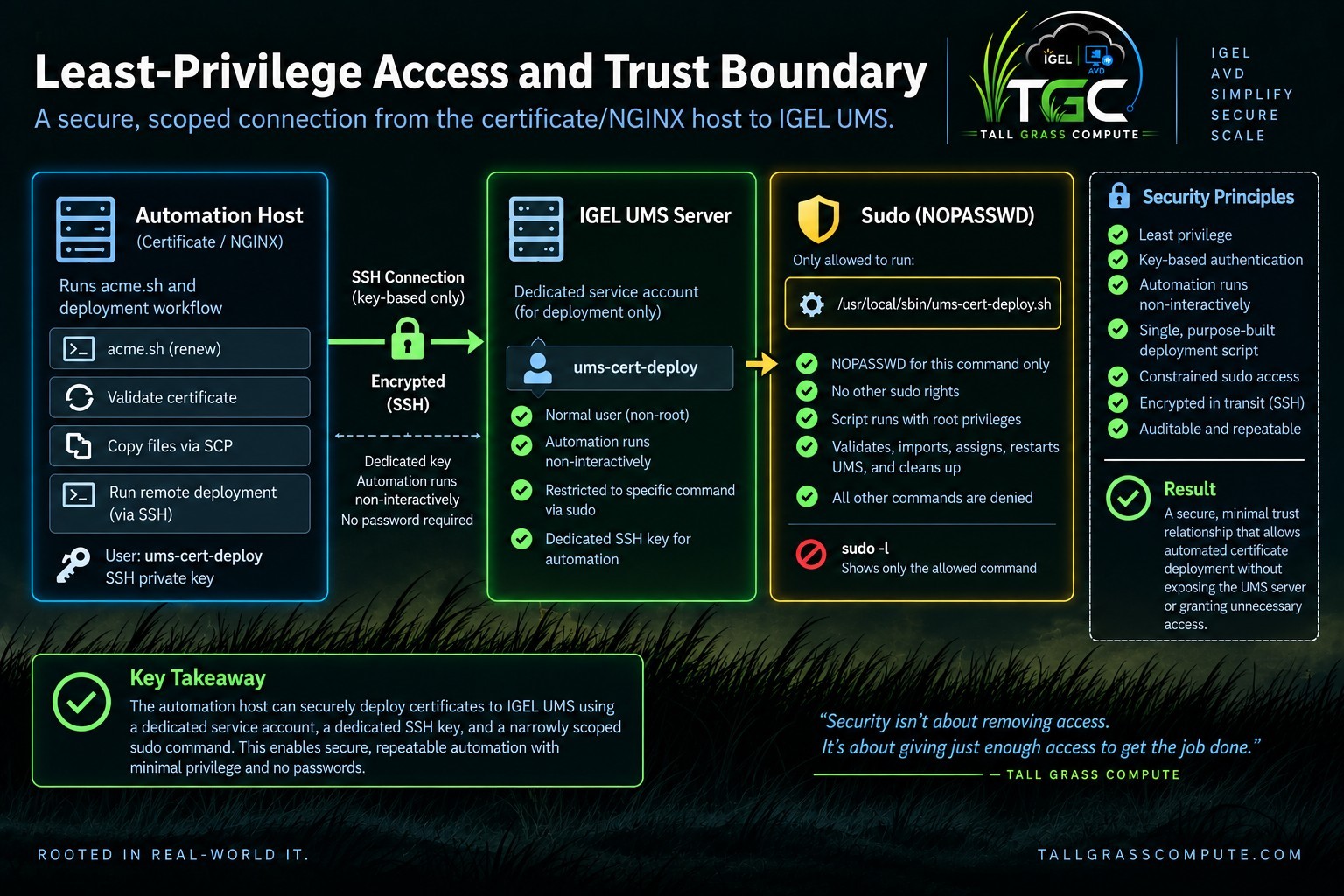
The finished path uses a dedicated ED25519 SSH key owned by acme. The public key is installed only for ums-cert-deploy on the UMS Server. SSH host verification remains enabled; the UMS host key was verified before being added to known_hosts.
The remote account stages files under /var/lib/ums-cert-deploy, which is restricted to that service identity. It does not receive general administrative rights. Its sudo policy permits exactly one command:
ums-cert-deploy ALL=(root) NOPASSWD: /usr/local/sbin/ums-cert-deploy.sh
The wrapper is owned by root, accepts no arbitrary paths or user-supplied arguments, and contains the privileged UMS operations. The unprivileged caller can request that one operation; it cannot redefine what the privileged operation does.
7. The UMS Deployment Wrapper
The root-owned UMS wrapper is both a security boundary and a reliability boundary. Before it changes UMS, it verifies that the expected certificate and key exist, the certificate contains the expected SAN, the issuer matches the lab's expected ZeroSSL intermediate, and the certificate and private key contain the same public key.
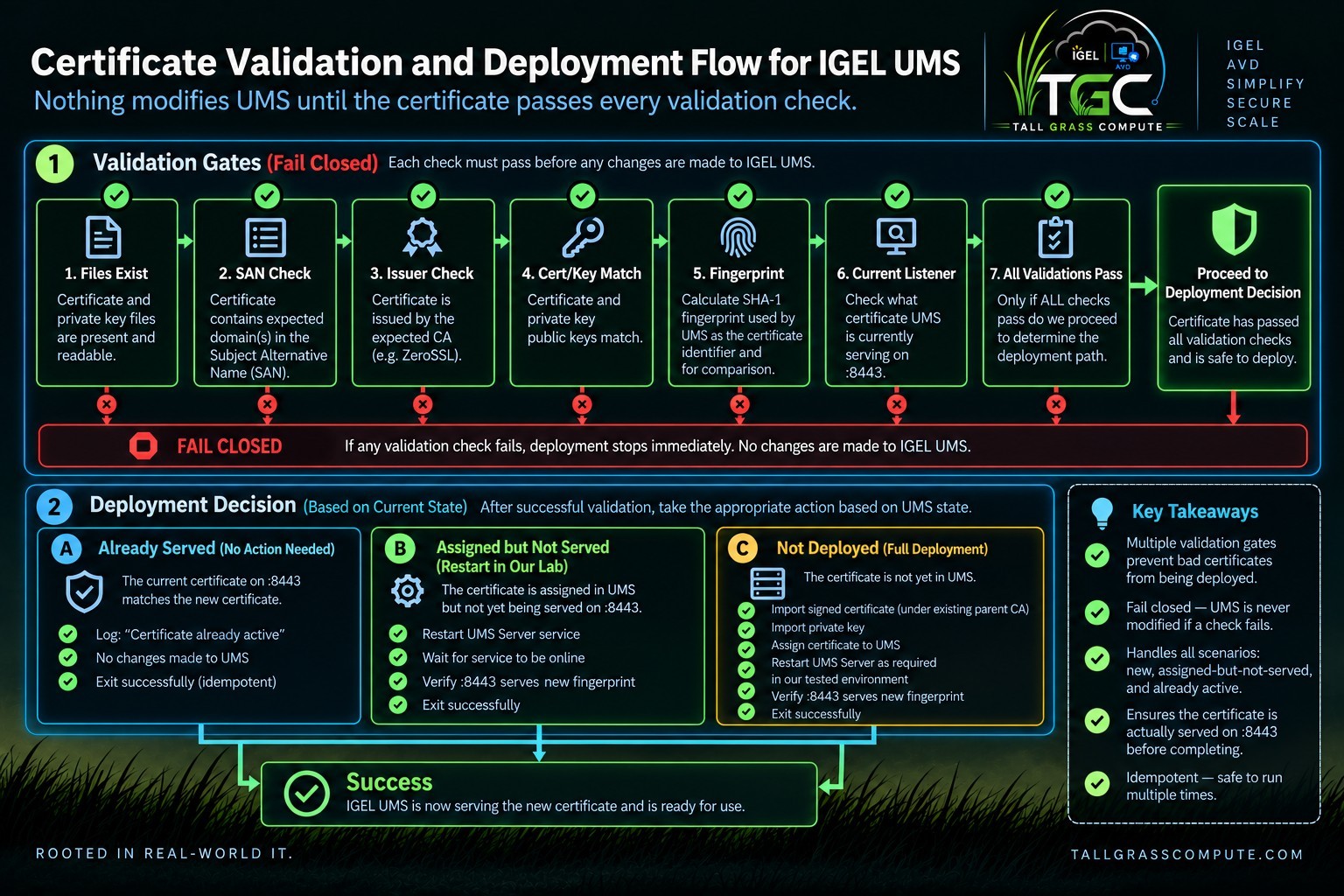
The wrapper then calculates the certificate's SHA-1 fingerprint because the IGEL UMS Web Certificate CLI uses SHA-1 fingerprints as certificate identifiers. This is an identifier required by the management interface, not a decision to use SHA-1 for certificate signing.
CERT_PUB="$(
openssl x509 -in "$CERT" -pubkey -noout |
openssl pkey -pubin -outform DER 2>/dev/null |
sha256sum | awk '{print $1}'
)"
KEY_PUB="$(
openssl pkey -in "$KEY" -pubout -outform DER 2>/dev/null |
sha256sum | awk '{print $1}'
)"[[ "$CERT_PUB" == "$KEY_PUB" ]] ||
{ echo "ERROR: Certificate and private key do not match."; exit 1; }After validation, the wrapper checks the certificate actually being served by the local UMS HTTPS listener. Because this code executes on the UMS Server, 127.0.0.1:8443 connects directly to UMS. It does not pass through NGINX or another reverse proxy.
timeout 5 openssl s_client \
-connect 127.0.0.1:8443 \
-servername "$EXPECTED_NAME" \
</dev/null 2>/dev/null |
openssl x509 -noout -fingerprint -sha1
If the expected fingerprint is already being served, the wrapper exits successfully without importing, assigning, or restarting anything.
Keeping that privileged logic on the UMS server also reduces what has to cross the SSH boundary. The automation host does not send a command line describing what to import or where to place it; it stages two expected files and requests one predefined operation. The wrapper owns the paths, the validation rules, and the UMS commands. That makes the remote interface intentionally boring - and much harder to misuse.
This separation turned out to be useful for troubleshooting as well as security. The unprivileged side is responsible for orchestration and transport, while the root-owned wrapper is responsible for changing UMS. When a deployment fails, the boundary makes it easier to determine whether the problem occurred before privilege elevation, during certificate validation, or while UMS was being changed and verified.
Most importantly, the wrapper is state-aware. It does not assume that every invocation requires an import or a restart. Before changing anything, it compares the expected certificate with the certificate actually presented by the local UMS listener. That runtime check becomes the basis for the deployment decisions described next.
This separation also gives the wrapper enough local context to make the right decision without expanding the remote account's privileges. It can compare the intended certificate with the certificate actually served by UMS and choose among no action, a restart, or a full import and assignment. That state-aware behavior becomes especially important in the next part of the story. The remote caller stays simple; the UMS wrapper owns the final deployment decision. The interface is intentionally narrow in another way: the privileged wrapper accepts no caller-supplied file paths or operational arguments. The SSH account can request the certificate-deployment operation, but it cannot redirect the wrapper toward an arbitrary key, choose a different certificate location, or substitute another privileged command. The root-owned code retains control of the files, validation rules, and UMS commands used inside that operation. This creates a clear failure boundary: validation occurs before UMS is modified, while listener verification afterward proves whether the runtime state actually changed.
Seen this way, the wrapper is closer to a desired-state operation than a conventional deployment script. The caller does not tell root to import, assign, or restart anything; it supplies the expected certificate material and requests one predefined operation. On every invocation, the wrapper re- evaluates UMS and the live listener, then chooses the smallest action necessary. That makes retries safer after a transient failure or interrupted run, because the same entry point can recognize a completed deployment, recover from an intermediate state, or perform the full deployment without blindly repeating privileged work.
8. The Important Discovery: Assignment Isn't Activation
My initial assumption was that assign-cert was the endpoint of the workflow. UMS accepted the assignment, so I expected the HTTPS listener to begin presenting the new certificate immediately.
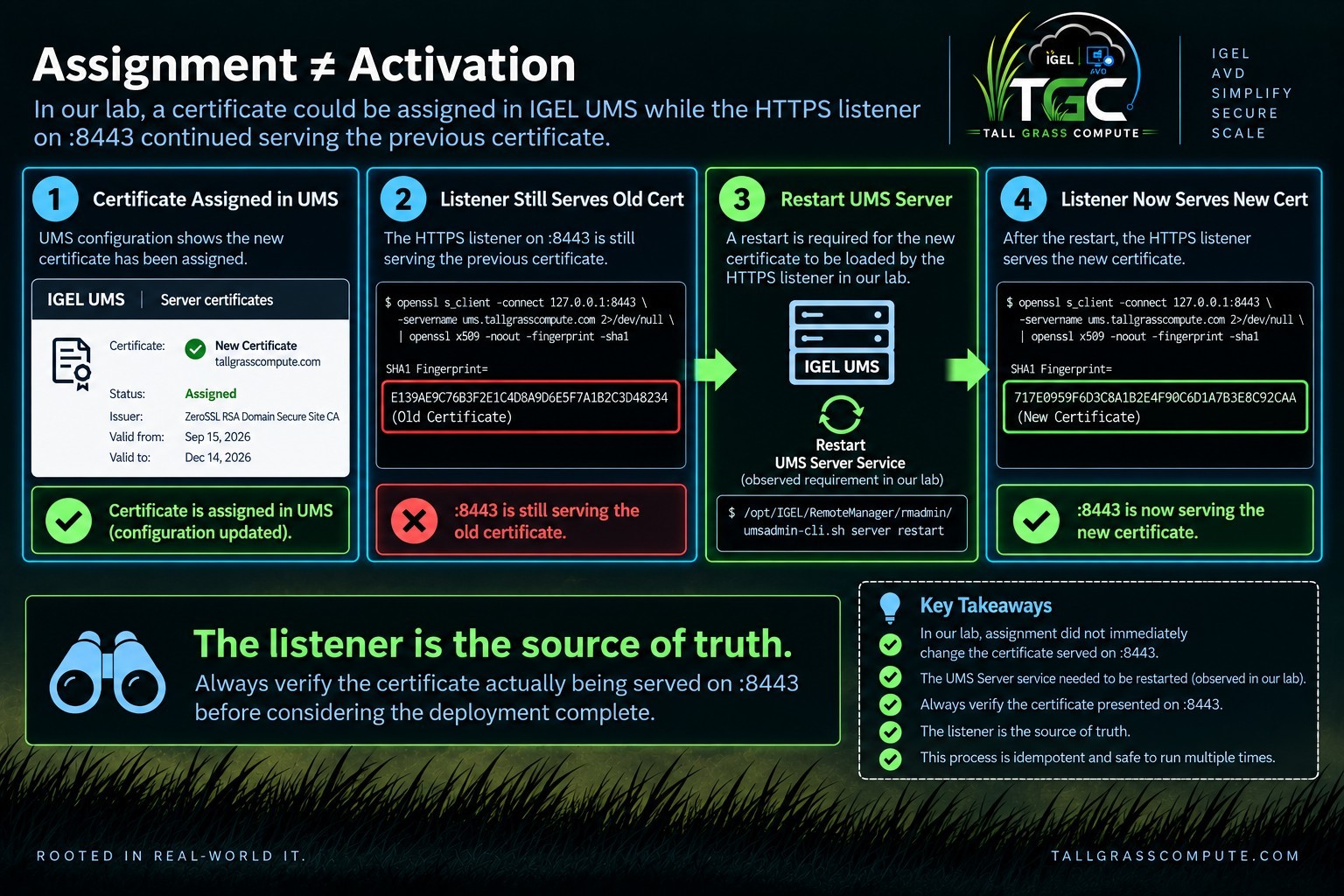
A direct listener check proved that assumption wrong in my lab. UMS could report the new certificate as assigned while TCP 8443 continued presenting the previous certificate. Configuration state told me what UMS believed should be active; runtime state told me what a client would actually receive.
Restarting the UMS Server caused the listener to begin presenting the assigned certificate. That behavior was reproduced during testing and became part of this implementation. I treat it as a lab- observed behavior rather than a universal statement about every UMS version, topology, or future release. That changed the finish line: an accepted management command became an intermediate result, while the listener fingerprint became the final proof. It also allowed the wrapper to recognize the assigned-but-not-served state and avoid re-importing certificate material unnecessarily.
Certificate assignment is not the same thing as certificate activation. The listener is the source of truth.
9. Trust, but Verify
The finished workflow verifies three different things. First, the certificate material itself must be valid for the intended name and match its private key. Second, UMS must contain and assign the intended certificate. Third, the running HTTPS listener must actually present that certificate.
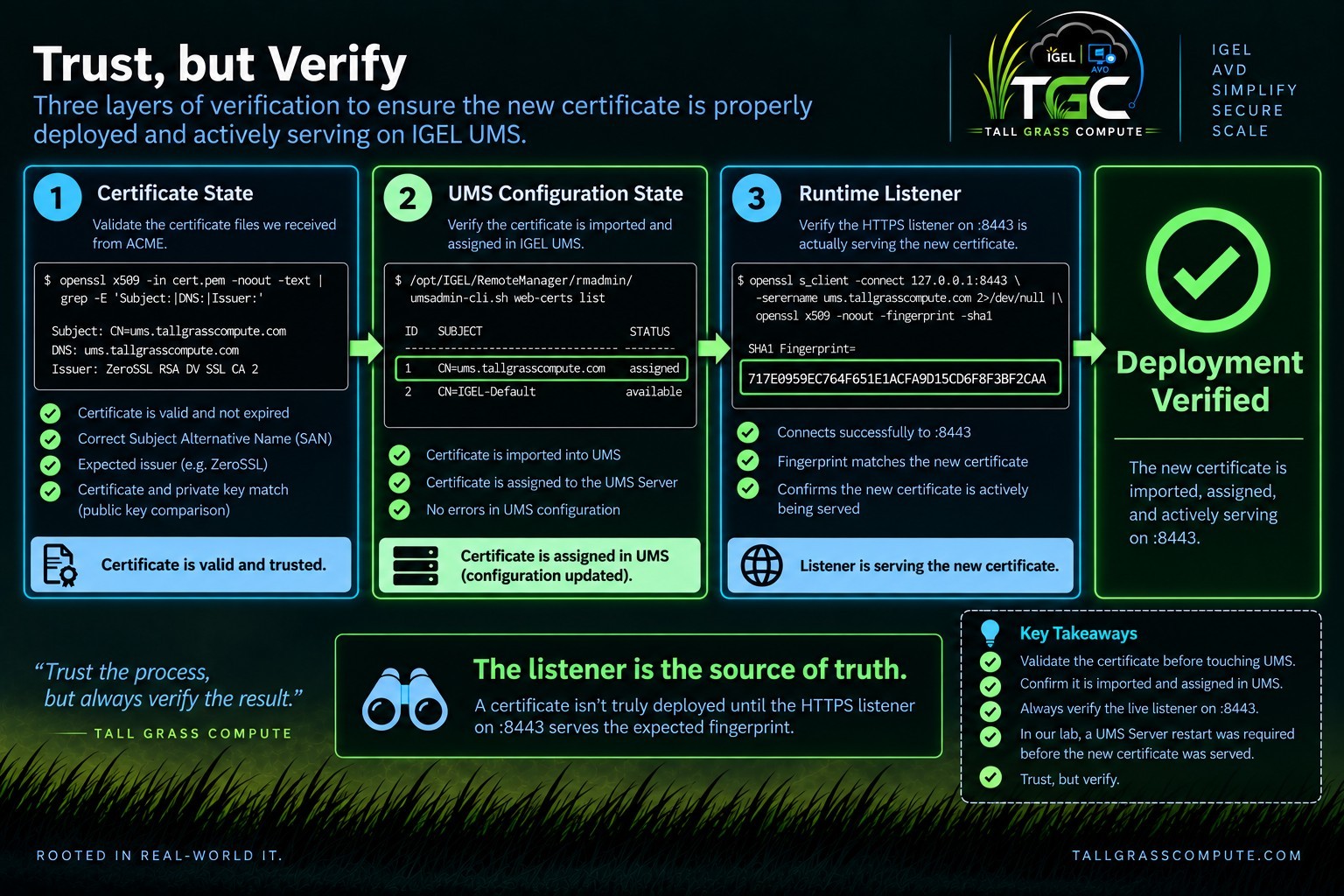
The third check is the one that turns configuration success into service success. It also avoids ambiguity when two certificates have the same common name and even the same expiration date: their fingerprints still identify the exact certificate objects.
A certificate deployment isn't successful because the management command succeeded. It's successful when the service is actually presenting the expected certificate.
10. Making the Process Idempotent
A deployment workflow should know when not to make a change. The listener fingerprint becomes the desired-state check.
The wrapper handles three states: if the expected certificate is already served, it exits without changes; if the certificate is assigned but not served, it restarts UMS and verifies the listener; if the certificate is neither assigned nor served, it performs the full import, private-key import, assignment, restart, and verification path.
Before deployment, the listener tells us whether we need to act. After deployment, the listener tells us whether the action worked.
11. Cleaning Up Sensitive Material
The certificate itself is public material. The private key is not. The workflow therefore treats the staged key as temporary data.
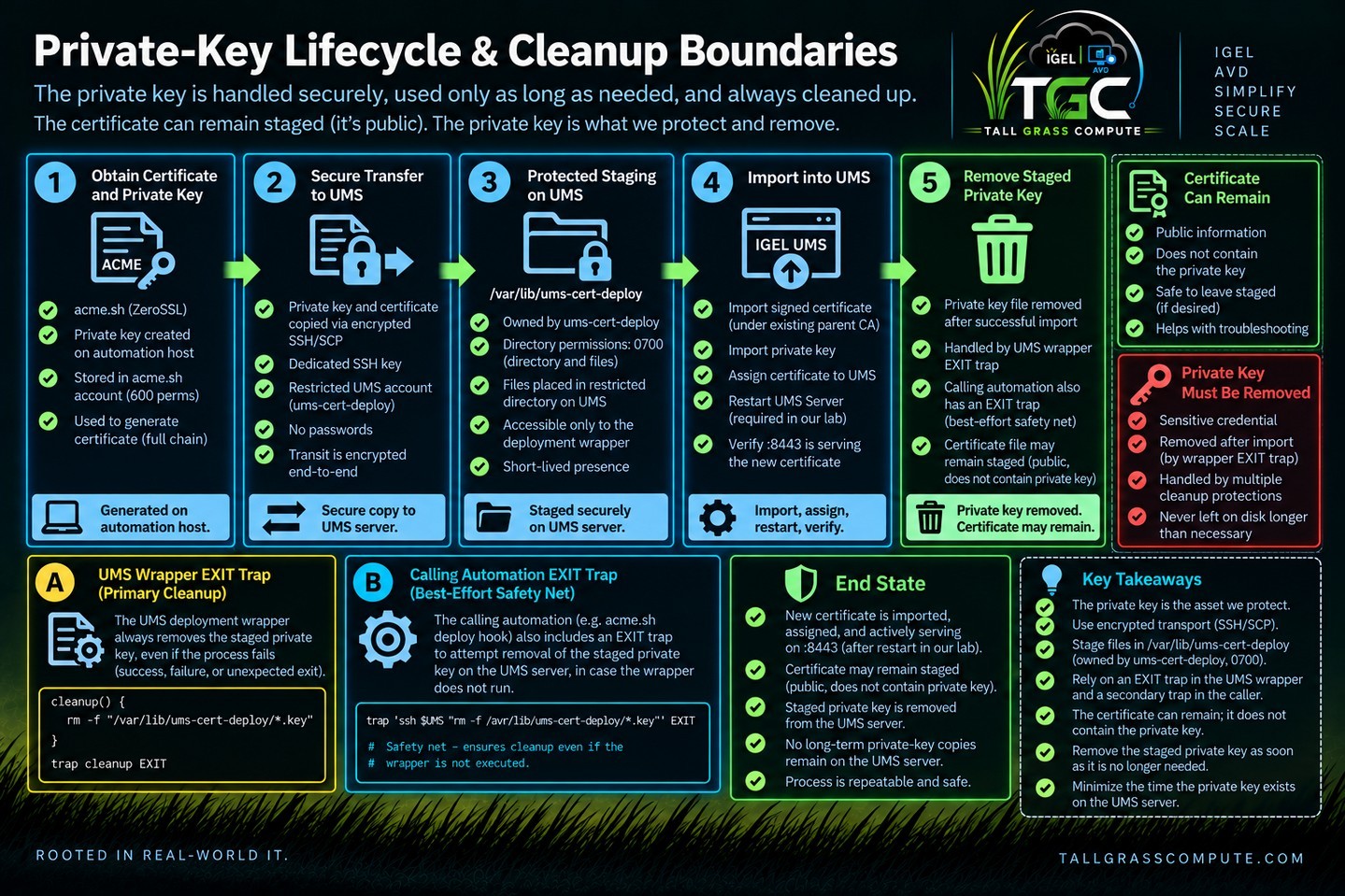
The UMS wrapper owns the primary cleanup trap:
cleanup() {
rm -f "$KEY"
}
trap cleanup EXIT
Because the wrapper runs with set -euo pipefail, the EXIT trap also covers validation failures and early successful exits. The caller has a second best-effort cleanup trap to cover the failure window where SCP succeeds but the remote wrapper never starts.
cleanup_remote_key() {
ssh -i "$SSH_KEY" \
-o BatchMode=yes \
-o ConnectTimeout=10 \
"${UMS_USER}@${UMS_HOST}" \
"rm -f '$REMOTE_KEY'" \
>/dev/null 2>&1 || true
}
trap cleanup_remote_key EXIT
The caller-side cleanup cannot delete a remote file while the host is unreachable, so the design also relies on the protected staging directory and dedicated service account. IGEL documents that an imported decrypted private key is encrypted again when it is saved in the UMS Database.
If automation has to handle sensitive material, cleanup shouldn't be an afterthought. It should be part of the workflow's failure handling from the beginning.
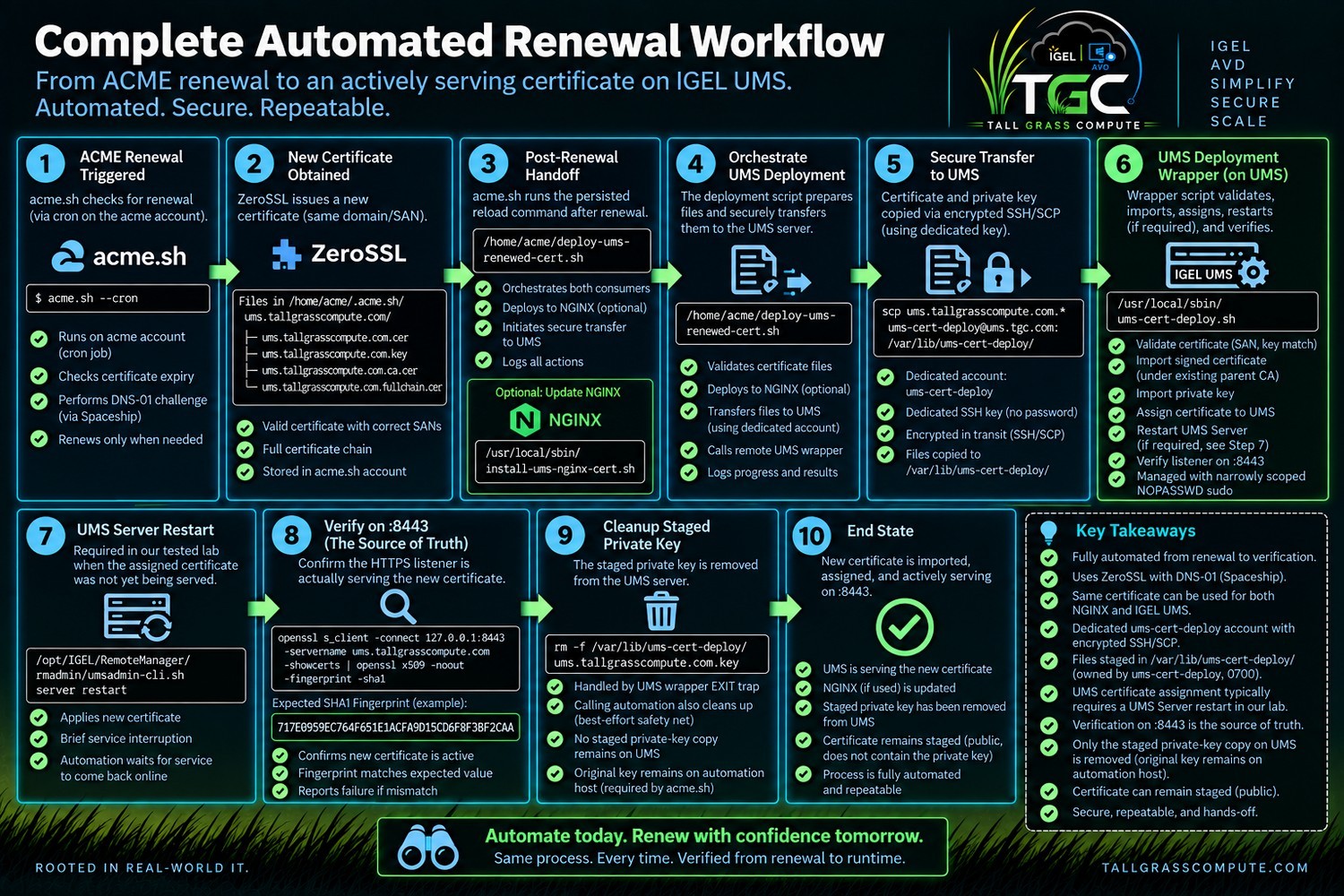
12. Putting It All Together - Automated Renewal
The handoff from normal ACME renewal to the custom deployment workflow is a persisted acme.sh reload command:
/home/acme/.acme.sh/acme.sh \
--install-cert \
-d ums.tallgrasscompute.com \
--reloadcmd "/home/acme/deploy-ums-renewed-cert.sh"
When a renewal actually occurs, acme.sh invokes the deployment orchestrator. The orchestrator runs as acme, validates that the expected files exist, invokes the narrowly scoped local NGINX wrapper where applicable, stages the certificate and key to UMS over SSH/SCP, and invokes the exact privileged UMS wrapper through sudo.
The acme.sh cron entry performs periodic renewal checks; it does not issue a new certificate every time it runs. During testing, a renew-hook attached to a skipped renewal did not persist the behavior I needed. The install-cert / reloadcmd approach did, and the final forced renewal demonstrated the complete handoff.
~/.acme.sh/acme.sh \
--renew \
-d ums.tallgrasscompute.com \
--force
13. Security Considerations
The security model improved significantly after the first working implementation. The final design uses dedicated identities, a dedicated SSH key, verified SSH host keys, protected staging, fixed paths, validation before privileged changes, exact-command sudo, root-owned wrappers, private-key cleanup, and listener-based idempotency.
Least privilege does not mean pretending that no operation requires root. It means exposing as little privileged capability as possible to the process that does not need it. In this design, the service account can request one root-owned deployment operation, but it cannot change the privileged code or execute arbitrary commands through sudo.
There are still explicit trust points. The acme account controls certificate material and DNS API credentials. The UMS staging directory temporarily receives a plaintext private key. The wrapper scripts are privileged. The expected issuer and parent CA fingerprint are environment-specific values that may need maintenance if the CA chain changes.
If knowing how the automation works would defeat its security, the automation wasn't secure to begin with.
The design also keeps the blast radius of each credential deliberately small. The Spaceship API credential is used for DNS validation, the dedicated SSH key is used for the UMS deployment account, and the UMS account can elevate only through the single root-owned wrapper. Compromise of one component would still be serious, but it would not automatically grant every privilege used by the complete workflow.
There is a practical maintenance benefit to this model too. Changes to ACME issuance can be made without rewriting the privileged UMS logic, and changes to UMS certificate handling can be made inside the wrapper without expanding what the remote account is allowed to execute. The trust boundary is explicit enough that future changes have a clear place to live.
None of these controls removes the need to protect the automation host itself. It holds the ACME account, DNS API credentials, the certificate's original private key, and the SSH key used for deployment. In this design, that host is intentionally treated as sensitive infrastructure. Least privilege narrows the paths available to the automation; it does not make the system trustworthy if the host that controls those paths is neglected.
These boundaries also make later audits easier: each credential has a defined purpose, privileged work has one controlled entry point, and success can be checked independently at the service listener. That matters when credentials rotate, UMS is upgraded, or the automation host eventually changes.
Least privilege also has an operational lifecycle. After a UMS upgrade or credential rotation, the assumptions behind the automation should be revalidated: confirm the CLI behavior, staging permissions, sudo scope, and dedicated SSH path. Periodically exercising the complete unattended workflow helps expose a changed CA chain, API behavior, or UMS dependency before an actual certificate expiration makes the problem urgent.
14. Testing the Finished Automation
The final test deliberately followed the same path that a future unattended renewal will follow: establish a known baseline, perform a real ACME renewal, let the persisted deployment hook take over, independently verify UMS afterward, and finally rerun the deployment to prove idempotency. The figures in this section are the original screenshots captured during that test.
Before
Before the final renewal, the UMS Console, the UMS CLI, and a direct listener check all agreed on the same active certificate.


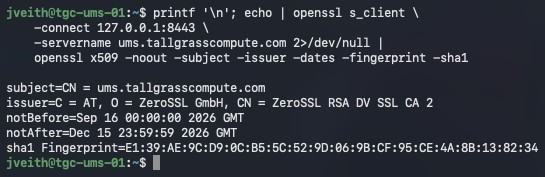
A direct connection to 127.0.0.1:8443 reported the same SHA-1 fingerprint, confirming that the certificate UMS considered assigned was also the certificate being served.
Those three checks establish different kinds of truth. The UMS Console gives an administrator- friendly view of the assigned certificate, the CLI gives the exact certificate identity UMS is tracking, and the direct listener check proves what clients actually receive on TCP 8443.
Capturing all three before renewal gave the test a clean baseline. After automation completed, the same three views could be compared again. That made the final test more than a successful command run: it demonstrated that configuration state and runtime state moved together to the newly issued certificate.
Real Renewal
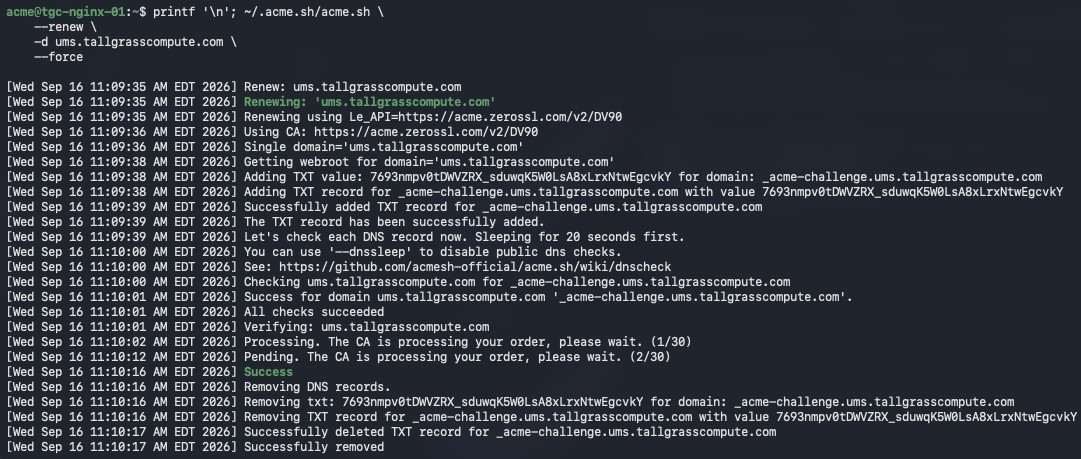
The real run created the DNS-01 TXT challenge through Spaceship, waited for public DNS validation, completed the ZeroSSL order, removed the TXT record, and issued the renewed certificate.
Automation Takes Over
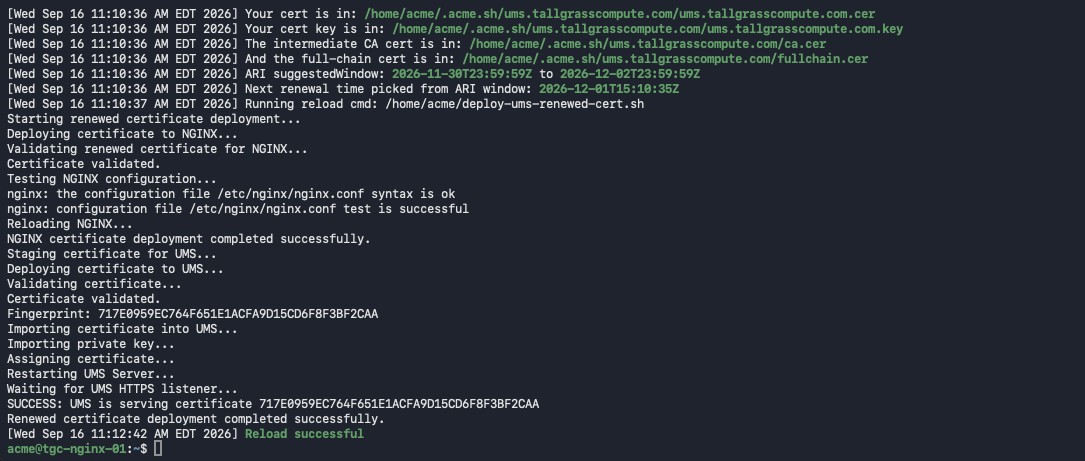
That output is the bridge between certificate renewal and deployment. The workflow validated the material, deployed the optional NGINX copy, staged the UMS files, imported and assigned the new certificate, restarted UMS, waited for the listener, and did not report success until the expected fingerprint was served.
After


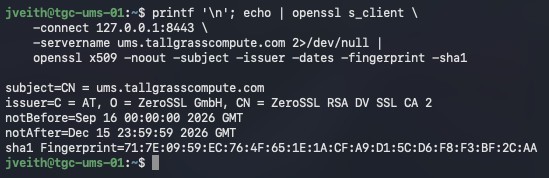
After the run, the old and new certificates both remained in the UMS certificate store, but only the new certificate was assigned:
The direct TCP 8443 listener independently reported the new fingerprint. This is also a useful example of why expiration date is not a reliable certificate identity: both certificates had the same common name and the same expiration date, but different fingerprints.
Taken together, the three post-renewal views close the loop on the test. The UMS Console shows the newly imported certificate as the one in use, the CLI identifies that same certificate by its SHA-1 fingerprint, and the direct listener check proves that TCP 8443 is presenting that fingerprint to clients. No single view is being asked to prove more than it actually can.
The old certificate remaining in the UMS store is also intentional evidence rather than a failure condition. The automation's job is to make the renewed certificate active and verifiable, not to perform unrelated certificate-store housekeeping. That keeps renewal focused and avoids deleting historical material simply because a new certificate was issued.
Just as important, the transition happened through the same unattended path intended for future renewals. There was no manual certificate import, assignment, or listener correction after the ACME renewal completed. The automation moved UMS from the known baseline to the verified new runtime state on its own.
One More Test
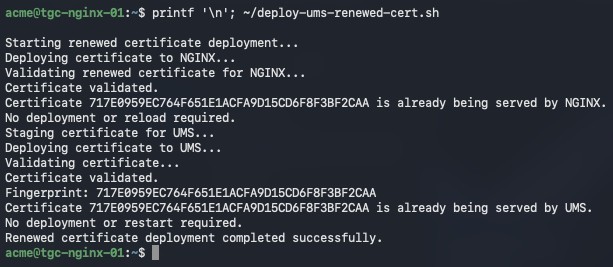
The second run made no unnecessary changes. Idempotency was proven against the running services, not merely inferred from script logic.
The certificate that came out of the renewal process was the certificate actually being served by UMS on TCP 8443.
15. Final Result
What began as a relatively simple goal - automatically renew a public certificate for IGEL UMS - ended up solving a larger problem. The finished workflow now manages the certificate from renewal all the way to the running UMS service.
During a normal renewal, no administrator needs to export a certificate, copy files manually, open the UMS Console, import a private key, assign a certificate, restart a service, or check afterward to see whether it worked.
More importantly, the automation does not confuse completion with success. A successful ACME renewal is not enough. A successful file transfer is not enough. A successful UMS import is not enough. Even a successful assignment is not enough.
The workflow isn't complete until the running UMS HTTPS listener presents the certificate that was just renewed.
Before this project, certificate renewal and certificate deployment were effectively separate problems. Now they are one lifecycle:
Renew -> Validate -> Deploy -> Activate -> Verify -> Clean Up
And if the workflow runs again:
Verify -> Already correct -> Do nothing
Good automation should not merely know how to make a change. It should also know when not to make one.
The most useful discovery in this project was not an acme.sh option or an IGEL CLI command. It was discovering that, in my lab, assigning a new Web Certificate to UMS did not necessarily mean the HTTPS listener immediately began presenting it. That changed the design.
Don't stop at verifying that your configuration changed. Verify that the service behavior changed with it.
The next time this certificate reaches its renewal window, there shouldn't be anything for me to do. That's ultimately what I wanted: not a script that makes certificate renewal easier, but a system that handles the lifecycle itself and provides enough validation that I can trust the result.
Renew the certificate. Deploy it securely. Verify the service. Then get out of the way.
What I Learned
I started this project thinking I was going to automate a certificate renewal. By the time I finished, the certificate renewal itself was probably the least interesting part.
acme.sh, ZeroSSL, and DNS-01 already solve that problem very well. The more interesting engineering started after the new certificate existed: how to get it into UMS securely, how much privilege the automation really needed, what could go wrong along the way, and how to prove that the process actually worked.
One of the biggest lessons was that getting something working and getting it working the way I wanted were two different milestones.
The first version worked. It also used more privilege than I was comfortable with. Rather than throwing it away, I used that working version to understand exactly which operations required privilege and then started narrowing the boundaries around them.
That eventually led to dedicated service accounts, separate SSH credentials, restricted sudo permissions, root-owned wrappers, protected staging, certificate validation, and automatic private- key cleanup. I probably wouldn't have designed all of that correctly on the first attempt. And that's okay. Sometimes you need to get far enough into a problem to understand where the real boundaries are.
The other major lesson came from something I didn't expect at all. I assumed that once UMS successfully accepted assign-cert, the job was finished. Then I checked the actual HTTPS listener. It was still serving the previous certificate.
The listener is the source of truth.
Once I started thinking about the problem that way, other pieces fell into place. The same listener check that verifies a successful deployment can also determine whether a deployment is necessary. If the expected certificate is already being served, don't import it again. Don't assign it again. Don't restart UMS again. Just leave a correctly functioning system alone.
I also came away with a slightly different view of least privilege in automation. Least privilege doesn't necessarily mean eliminating root from every process. Some operations legitimately require it.
How little privileged capability can I expose to the process that doesn't need it?
In this case, the answer wasn't giving the automation account general sudo access. It was allowing it to request one specific operation through code that it couldn't modify. That's a pattern I expect I'll use again.
Finally, the last end-to-end test reinforced something I've learned repeatedly over the years: don't test only what you built. Test the assumption behind what you built.
We didn't stop because the renewal succeeded. We didn't stop because the deployment script said SUCCESS. We went back to UMS independently and checked the Console, the CLI, and finally the certificate being presented on TCP 8443. Then we ran the deployment again just to make sure it knew when to do nothing.
That was the point where I considered the project finished.
I started out trying to eliminate a manual certificate-renewal task. I ended up with something I like considerably more:
An automated process that can determine what needs to happen, perform only the privileged operations necessary to make it happen, and independently verify the result when it's done.
That's a much more interesting problem than renewing a certificate.
And it was a lot more fun to build.
References
The implementation details above were tested in the Tall Grass Compute lab. IGEL-specific interface and certificate-management behavior should be checked against the documentation for the UMS release you are running.
IGEL - Certificate Management in the UMS: https://kb.igel.com/en/universal-management-suite/current/certificate-management-in-the-igel-ums
IGEL - Using Your Own Certificates over the Web Port (default 8443): https://kb.igel.com/en/universal-management-suite/12.13.100/how-to-use-your-own-certificates-for-communication-over-the-web-port-default-8443-in-igel-ums
IGEL - UMS Administrator Command-Line Interface: https://kb.igel.com/en/universal-management-suite/12.08.110/igel-ums-administrator-command-line-interface
IGEL - Post-Installation Configuration of the UMS Server: https://kb.igel.com/en/universal-management-suite/current/post-installation-configuration-of-the-igel-ums-server
Comments
Questions, feedback, or something you tried differently? Leave a comment below.