
Tall Grass Compute started with a simple goal: build a useful virtualization platform from hardware I already had, then let real lab work determine what needed to change. The result is not a giant enterprise datacenter squeezed into a basement. It is a deliberately practical Proxmox environment built around two HP Z2 G4 workstations and a handful of small supporting systems.
This article is the story of that platform: how two independent hosts became a cluster, how the network evolved, why storage was split into distinct roles, how backup and management moved outside the compute nodes, and where the design still has room to grow.
1. The Proxmox Foundation
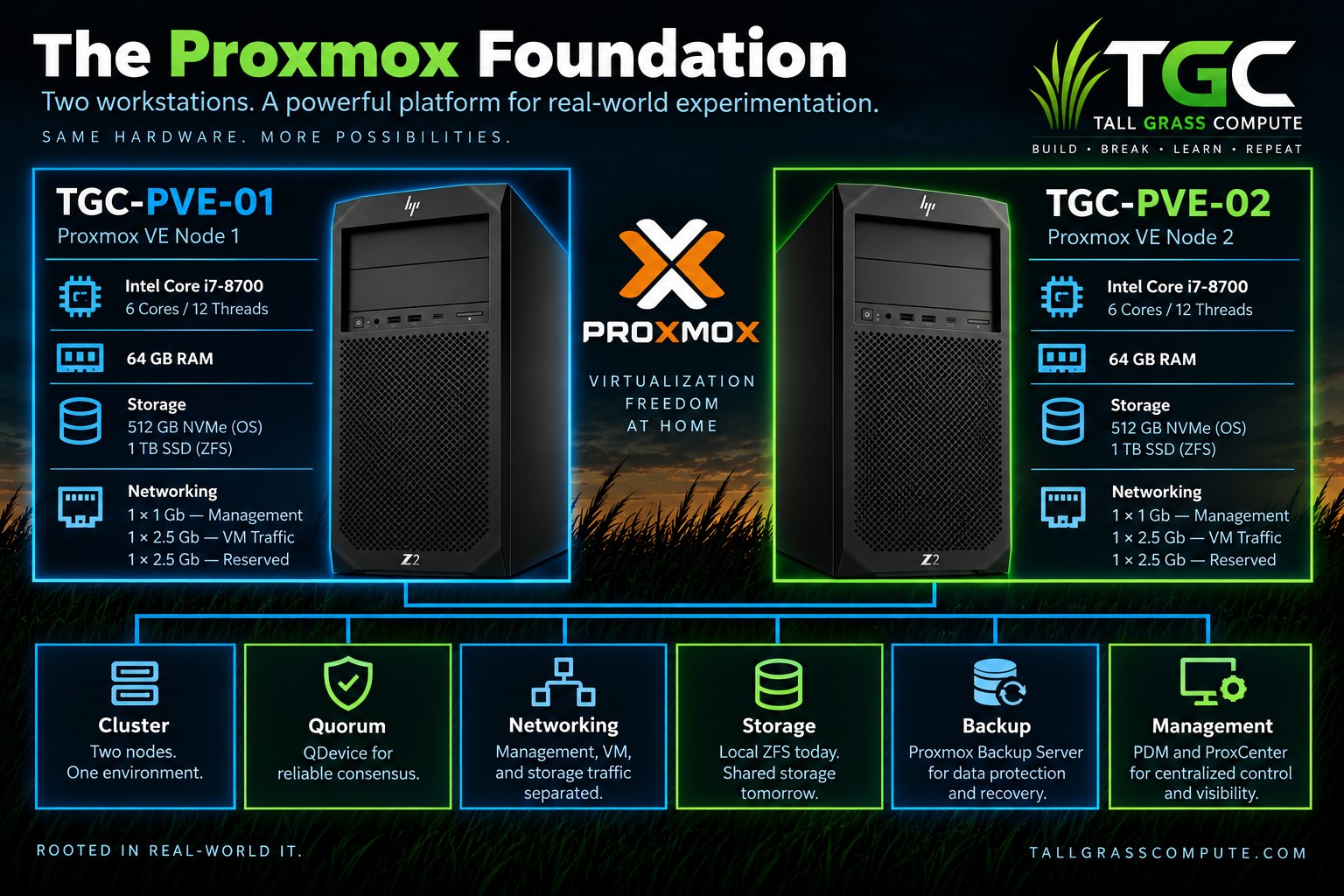
The compute layer is intentionally modest. TGC-PVE-01 and TGC-PVE-02 are HP Z2 G4 workstations, each built around an Intel Core i7-8700 with 6 cores and 12 threads, approximately 64 GB of RAM, a 512 GB NVMe system drive, and a separate 1 TB-class SATA SSD used for local ZFS storage.
They are not rack servers, and that is part of the point. For a homelab, the Z2s provide enough CPU, memory, storage, and PCIe flexibility to support serious experimentation without requiring datacenter hardware.
Each system also has three network interfaces available: the onboard 1 Gb interface and two 2.5 Gb add-on interfaces. That flexibility became important later, because the network design changed significantly as the lab matured.
The two machines began as independent Proxmox hosts. The platform became more interesting when I stopped thinking of them as two separate computers and started designing the services around them as one environment.
2. Turning Two Hosts into a Cluster
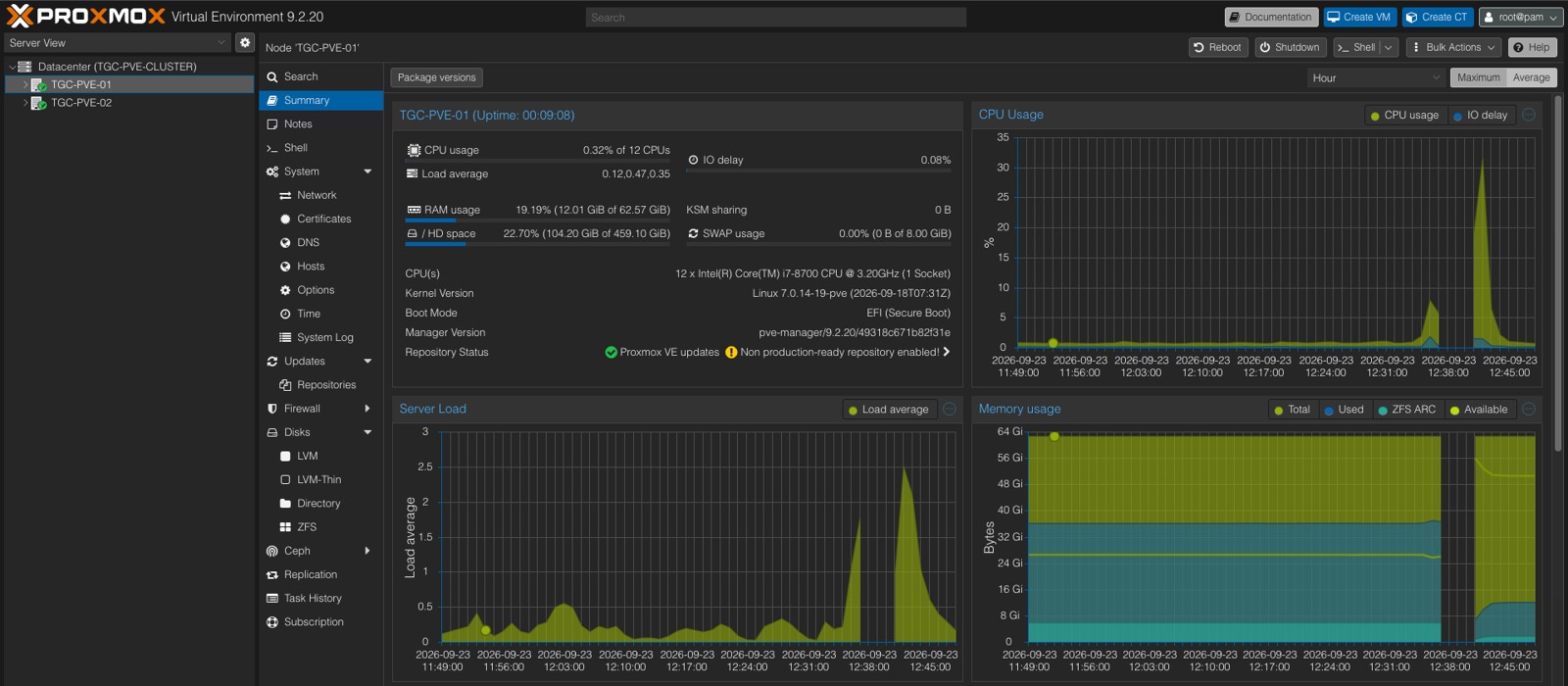
Creating a two-node Proxmox cluster gave the environment a common configuration and management model, but it also introduced an important requirement: quorum.
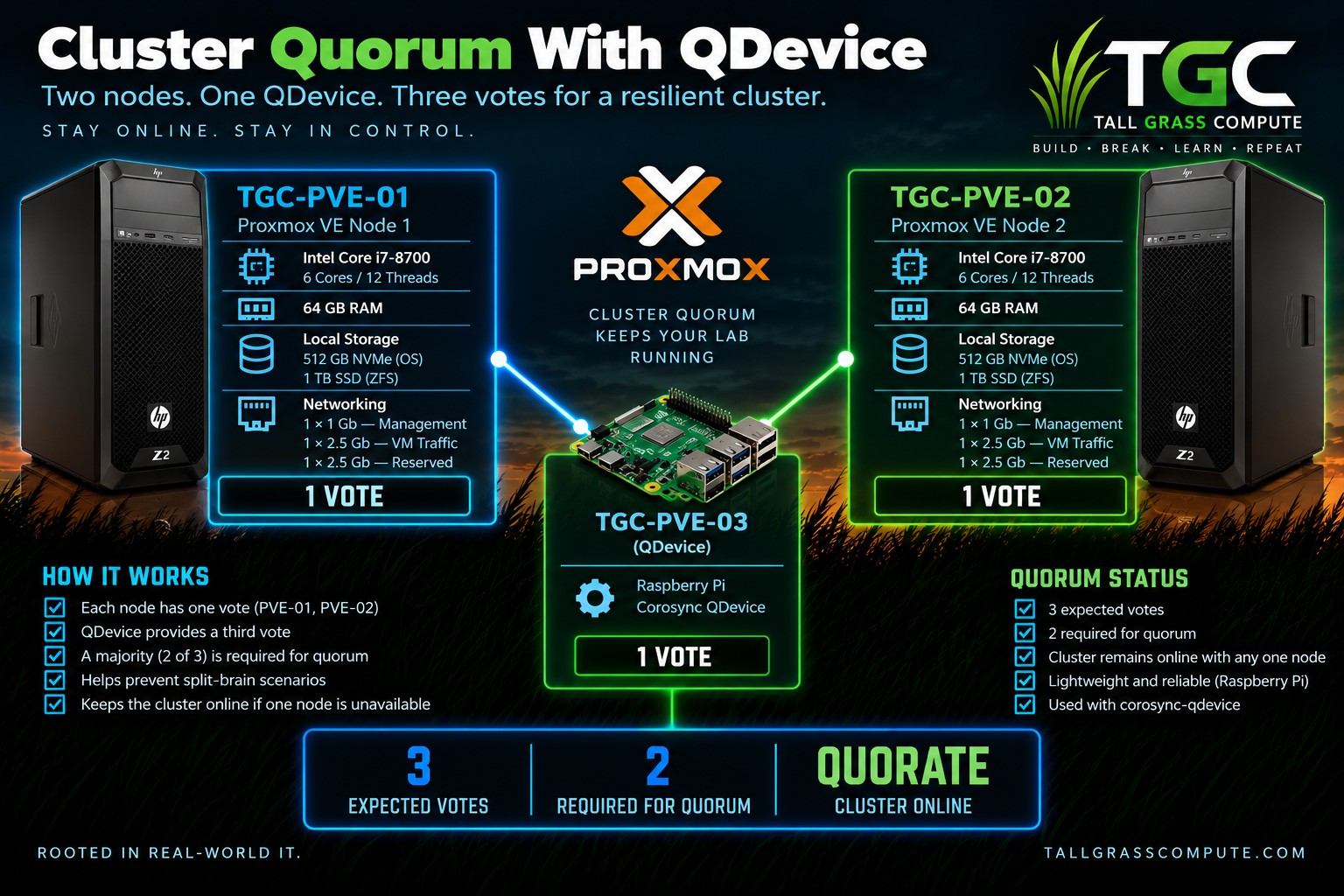
With only two voting nodes, losing one host can leave the cluster unable to establish a majority. The solution was not a third full Proxmox server. It was a lightweight external QDevice running on a Raspberry Pi.
TGC-PVE-01 contributes one vote. TGC-PVE-02 contributes one vote. The QDevice contributes the third. With three expected votes, two are required for quorum.
The Raspberry Pi does not run virtual machines and it is not another Proxmox VE node. Its job is deliberately narrow: provide an independent vote to help the two-node cluster reach a reliable consensus.
Clustered Does Not Mean Highly Available
Quorum makes the cluster healthier, but it does not make the storage shared. A VM whose disks live on the local ZFS pool of PVE-01 does not magically appear on PVE-02 if the first node fails.
That distinction became one of the recurring lessons of the build: clustering, quorum, backup, and high availability solve different problems.
Two independent Proxmox servers had become one cluster.
The resulting three-vote quorum model is shown below.
3. Networking: From Working to Intentional
The original network worked, but it did not make particularly good use of the hardware.
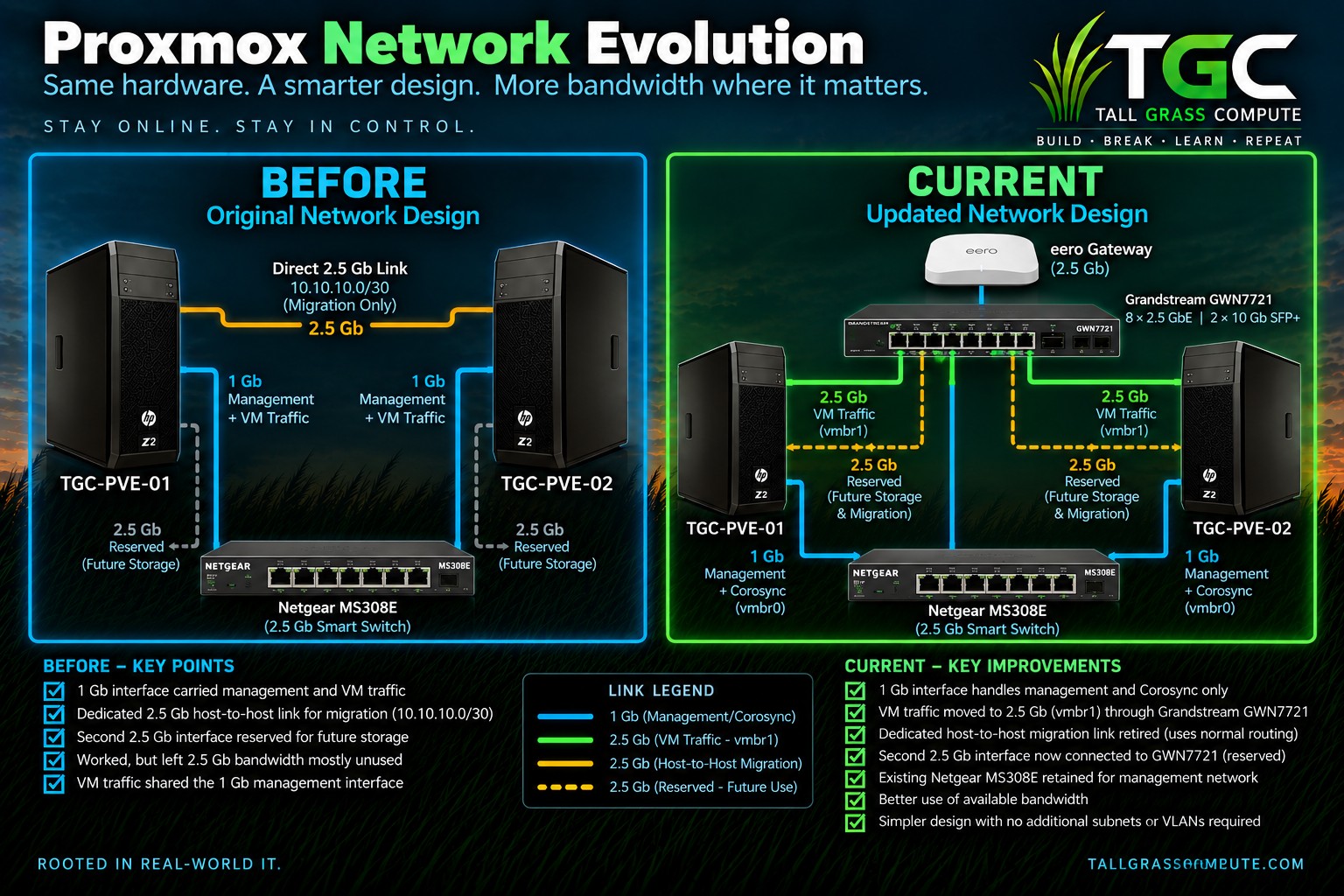
The onboard 1 Gb interface carried both Proxmox management and VM traffic. One 2.5 Gb interface on each Z2 was connected directly to the other host on a small /30 network and used for migration. The remaining 2.5 Gb interface was reserved for future storage.
In practice, most day-to-day workload traffic still traveled over the 1 Gb management path while the faster interfaces spent much of their time idle.
Adding the Grandstream GWN7721 created an opportunity to redesign the network around clear roles instead of preserving the original cabling simply because it worked.
The Current Design
The direct 2.5 Gb host-to-host cable was removed. The onboard 1 Gb interface now carries Proxmox management and Corosync traffic. The first 2.5 Gb interface is connected to the switching infrastructure and backs vmbr1 for VM and workload traffic. The second 2.5 Gb interface remains reserved for future storage or migration use.
vmbr1 intentionally has no host IP address. It acts as a Layer 2 bridge for the workloads while the Proxmox hosts themselves remain managed through the 1 Gb path.
The old migration-network pin was also removed. Migration currently uses normal secure host routing rather than pretending the new VM bridge is a dedicated migration network.
VMs were moved away from the original bridge and onto vmbr1. Connectivity testing confirmed that the workloads continued communicating normally through the new 2.5 Gb path.
A Small Networking Lesson
During the redesign, the onboard Intel interface on one node exposed intermittent e1000e hardware hangs. Disabling TSO, GSO, and GRO on the management interface stabilized the connection, and the setting was made persistent on both hosts.
That fix is not the headline of the architecture, but it is exactly the kind of detail a real lab exposes: sometimes the design is sound and the lesson is simply learning how the hardware behaves.
4. Local ZFS: Fast, Flexible, and Not Shared
Both Proxmox hosts use the same basic disk layout: an NVMe device for the operating system and a separate SATA SSD that provides local ZFS storage for virtual-machine disks.
ZFS gives the lab useful capabilities such as checksumming, snapshots, and compression. The pools use lz4 compression, and routine scrubs have completed cleanly with no reported data errors.
There is an important limitation, however: each zfspool is backed by a single physical SSD. There is no mirror and no RAIDZ. ZFS provides the storage features, but the pool itself is not redundant.
That is a conscious compromise. The Z2s are compute workstations, not dedicated storage servers, and independent backup protection is handled elsewhere.
Local ZFS also means VM disks remain node-specific. That is perfectly workable for the current lab, but it is the reason clustering alone does not provide automatic failover.
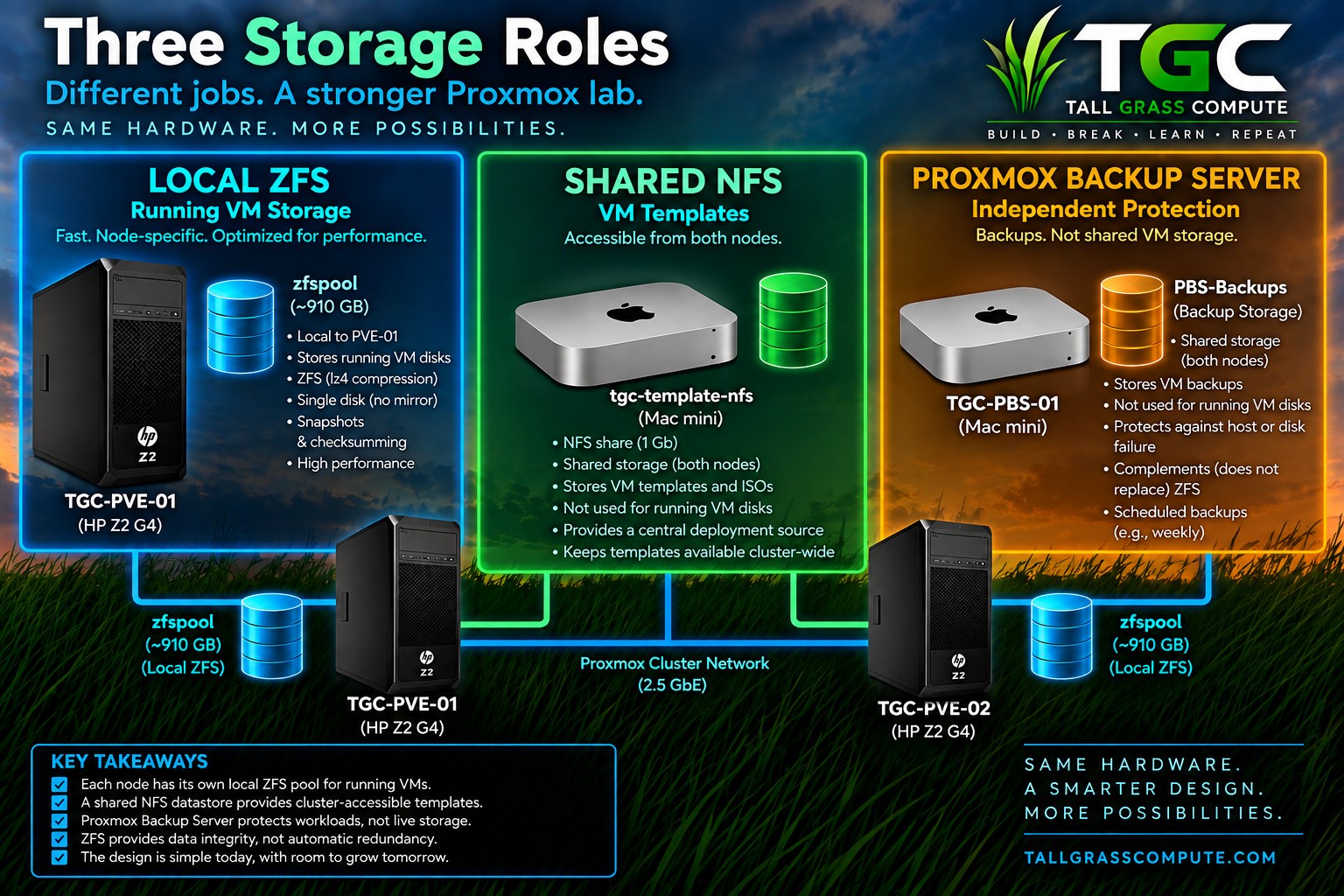
Three Storage Roles
The environment became easier to reason about once storage responsibilities were separated. Local ZFS runs workloads. Shared NFS distributes reusable templates. Proxmox Backup Server protects the result.
Local ZFS for running workloads. Shared NFS for templates. PBS for backups.
5. Shared Templates: Build Once, Deploy Anywhere
Local templates create an unnecessary placement problem: the source image exists only on the node where it was created.
The solution was a small shared NFS datastore, tgc-template-nfs, hosted on a separate Mac mini and mounted by both Proxmox nodes.
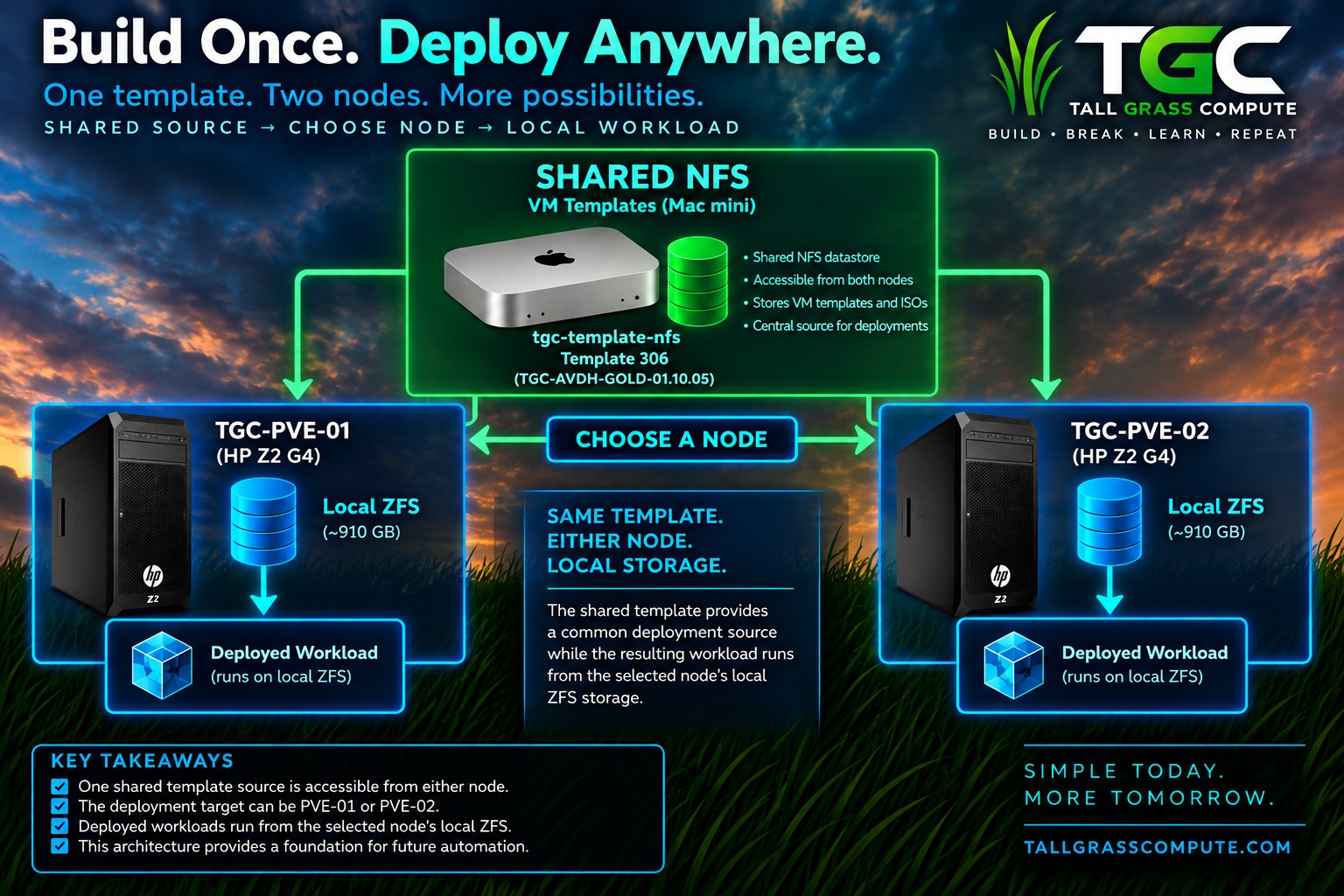
The shared source is not where the deployed workload continues to run. It is the common deployment source. Once a workload is created, its disks live on the selected node's local ZFS storage.
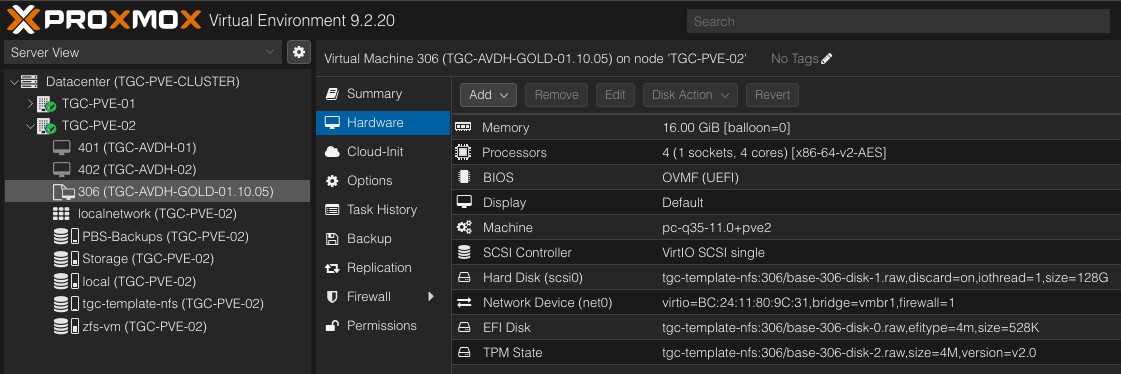
Template 306, TGC-AVDH-GOLD-01.10.05, is one example of that model. Either compute node can access the same generalized source without maintaining duplicate local copies.
The lifecycle is intentionally simple: maintain the image, publish the reusable template, then deploy from the same shared source to the selected compute node.
This NFS datastore is not an attempt to make all VM storage shared. It solves template distribution. Production shared workload storage is a separate problem and a future design decision.
One maintained image. One shared deployment template. Two possible compute nodes. Local storage for the resulting workload.
Evidence in Proxmox
The hardware view provides the concrete proof behind the model. VM 306 keeps its virtual disk, EFI disk, and TPM state on tgc-template-nfs, so either compute node can consume the same generalized source.
Shared Template Deployment Model
The architecture separates the shared deployment source from the local storage used by the resulting workload. That relationship is summarized below.
6. Backups Are Infrastructure Too
Local ZFS is not a backup. Shared NFS is not a backup. A cluster is not a backup.
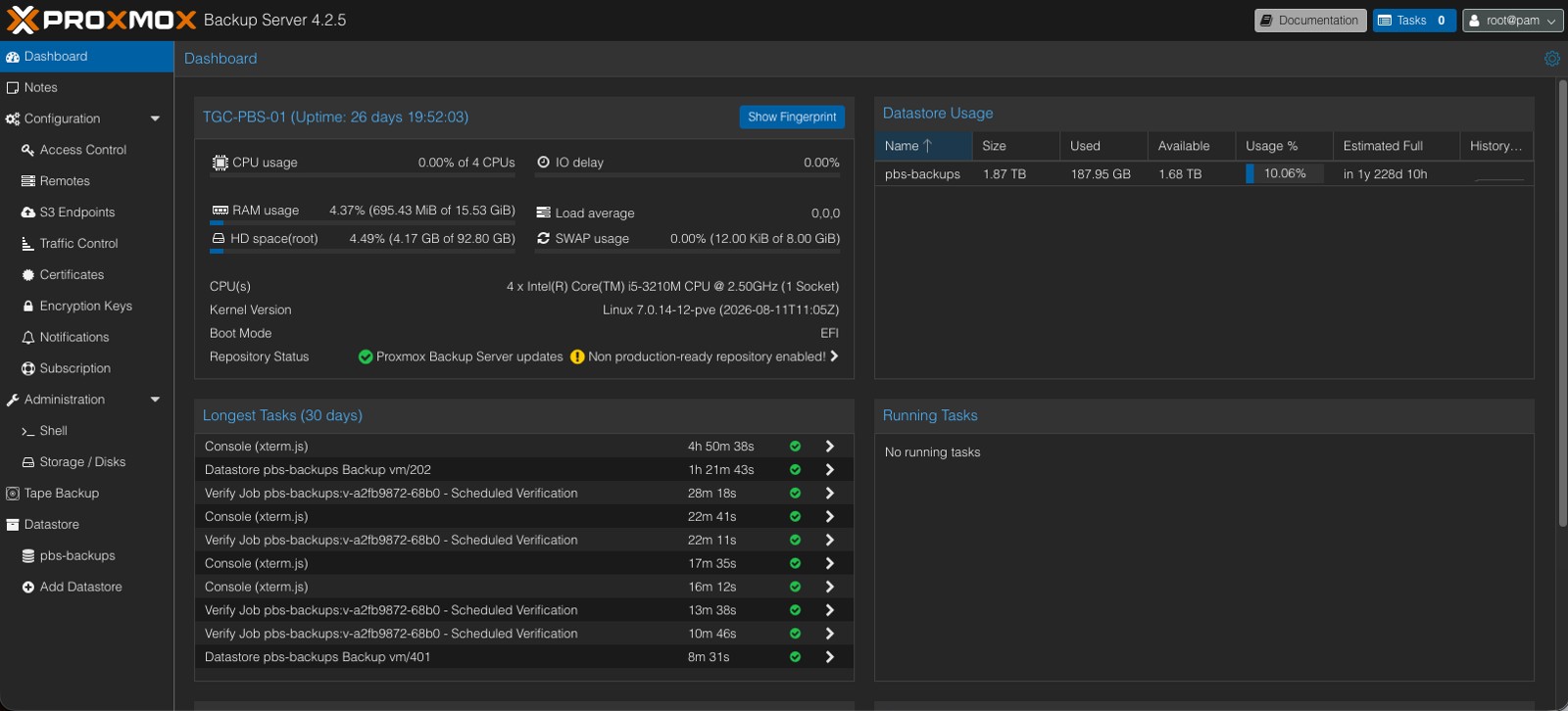
TGC-PBS-01 provides that separate protection layer. Proxmox Backup Server runs on a repurposed Mac mini with its own physical backup storage, creating a failure domain independent of the two Z2 compute nodes.
The Proxmox cluster sees PBS-Backups as a shared backup target, but that does not make it shared runtime storage. Its purpose is recovery.
Retention and verification make the backup process operational rather than aspirational. Recent recovery points and daily history are retained, and scheduled verification provides another check that the backups are usable.
That recovery path changes how the lab can be used. Experiments can be aggressive because there is a known way back when something goes wrong.
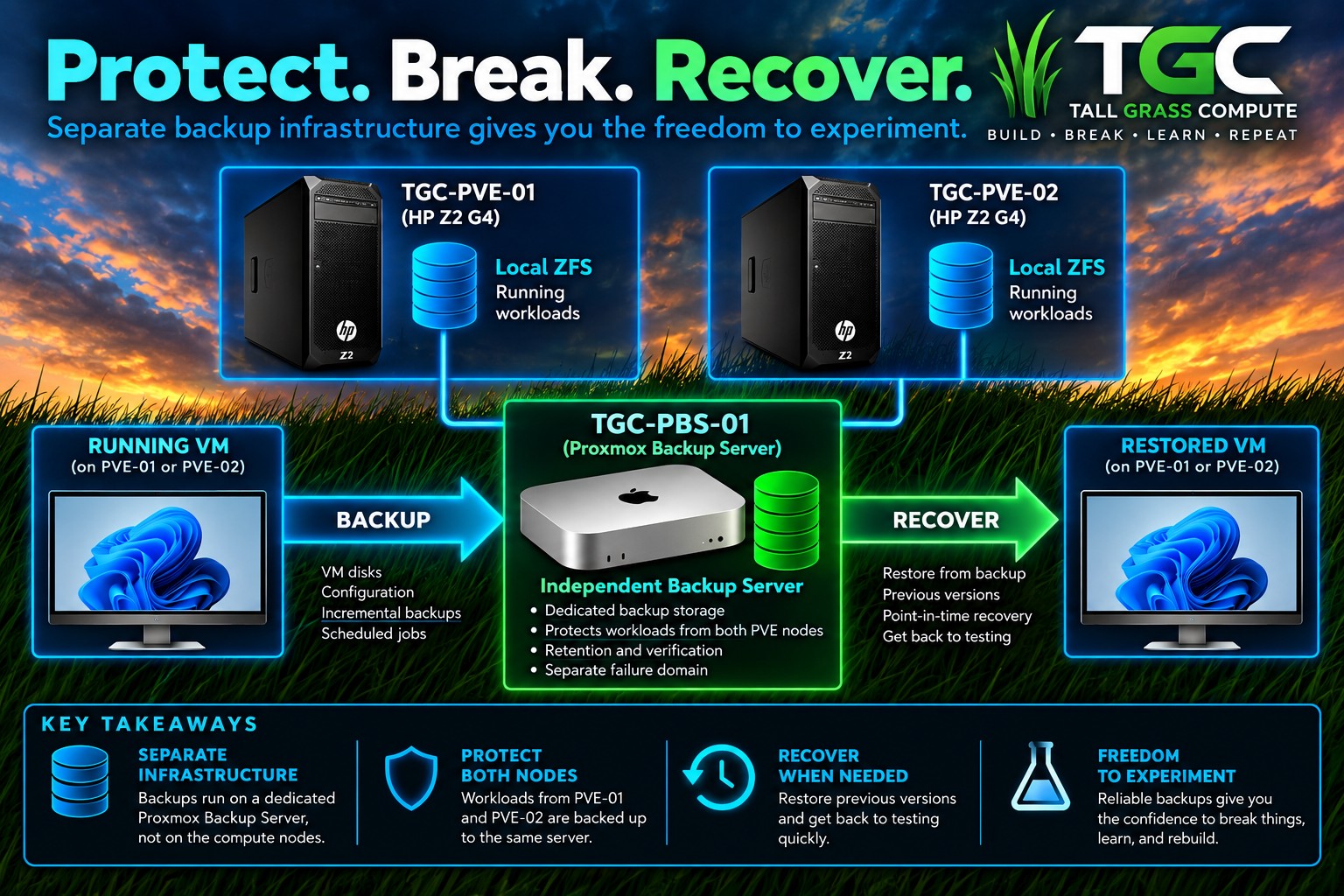
The Z2s run the workloads. Shared NFS provides the source. PBS protects the result.
Independent Protection and Recovery
The design deliberately keeps backup infrastructure outside the compute nodes. That protection-and-recovery relationship is summarized below.
The conceptual model is only useful if the recovery system is actually operating. The PBS dashboard below shows the independent datastore, completed backup activity, and verification work behind that protection layer.
7. Managing the Environment Above the Hosts
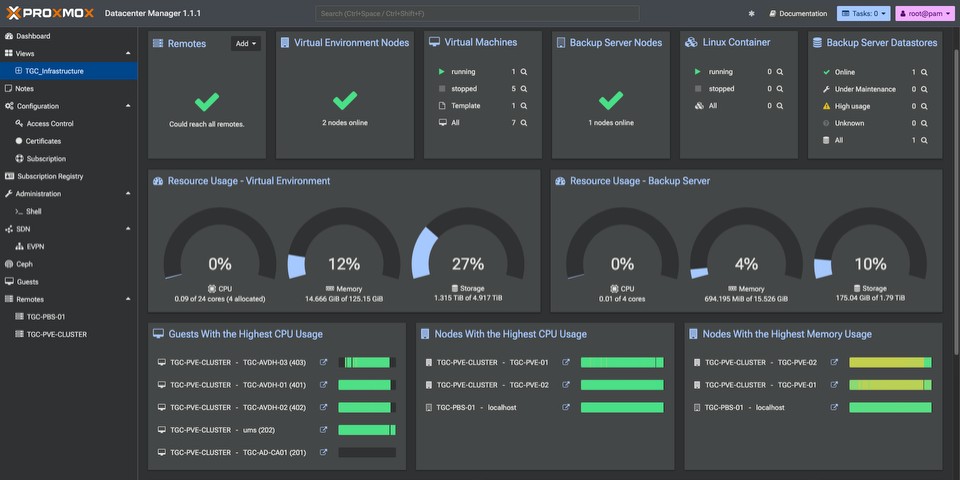
The native Proxmox VE interface remains the place for detailed host and VM administration, but the environment now also has two higher-level management views: Proxmox Datacenter Manager and ProxCenter.
Both are useful precisely because they present more of the environment at once. PDM provides a centralized Proxmox-oriented view across the VE cluster and Backup Server. ProxCenter provides another consolidated operational dashboard for the same infrastructure.
Neither replaces the underlying Proxmox tools. They sit above them and improve visibility.
For the lab, the practical value is simple: I can see the health and capacity of the environment without opening each individual host interface first.
The custom PDM view also avoids allowing a large subscription-status panel to dominate the page, leaving the information I actually care about front and center.
Proxmox Datacenter Manager
ProxCenter
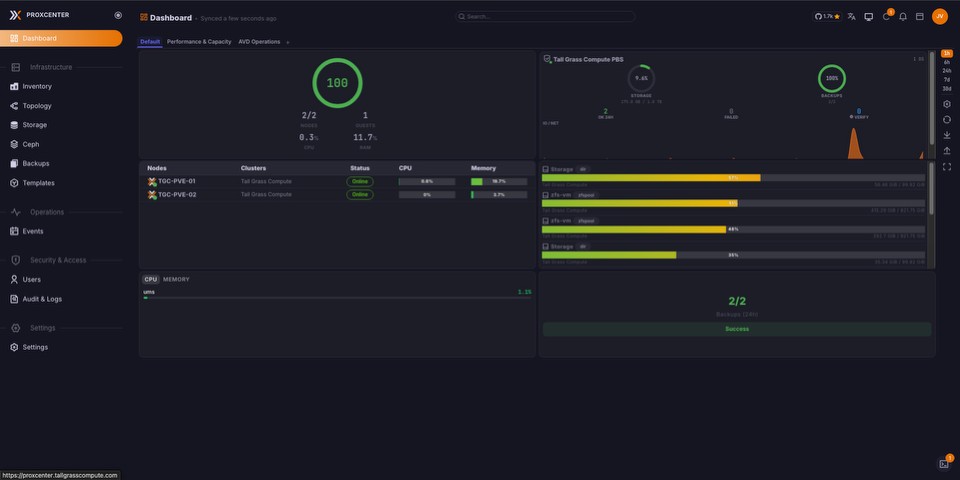
Together, PDM and ProxCenter provide complementary management views without replacing the native Proxmox VE interfaces.
8. Clustered Does Not Mean Highly Available
The environment is clustered. It has quorum. It has independent backups. It has shared template storage.
It is not yet a fully highly available virtualization platform.
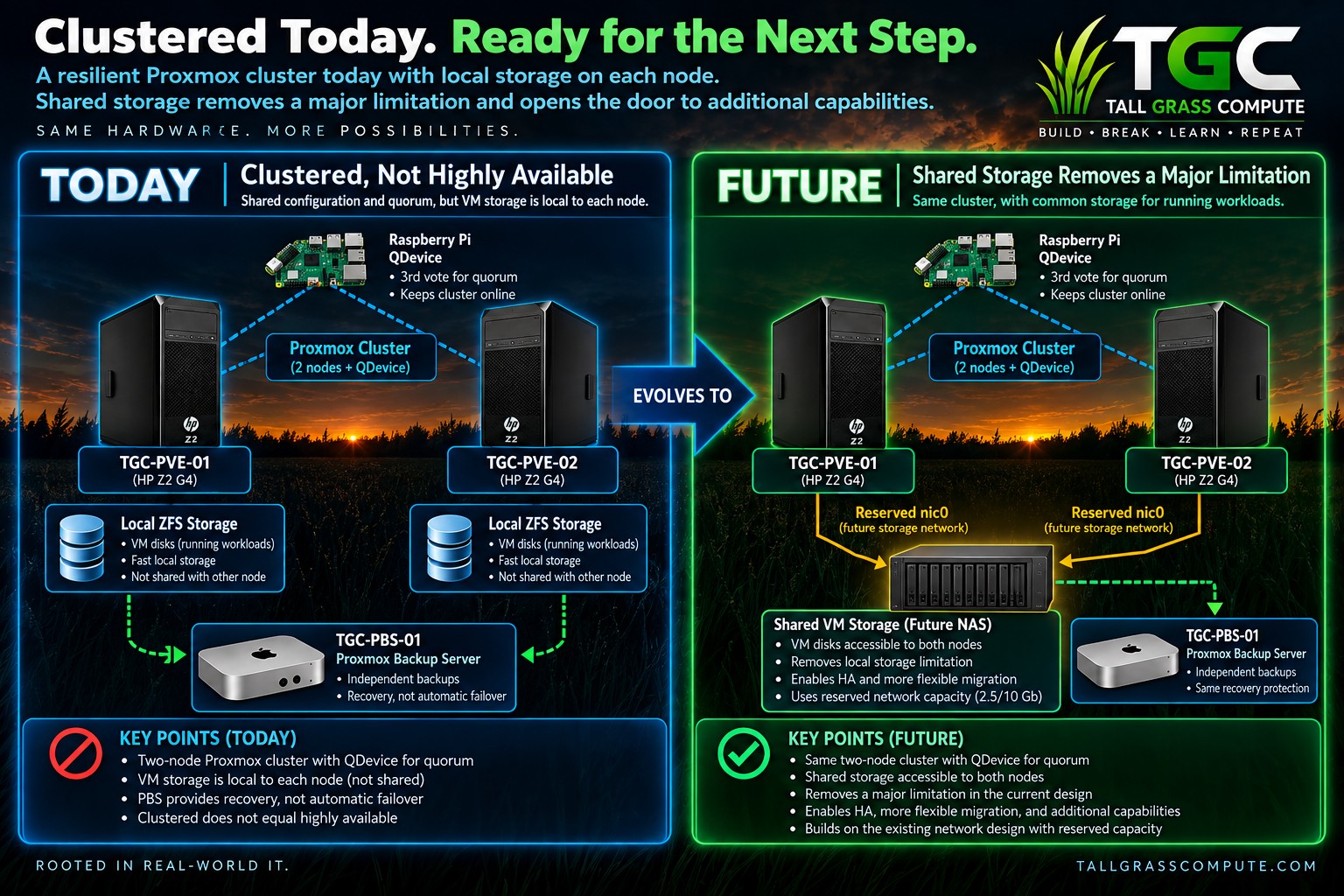
The reason is straightforward: running VM disks still live on local ZFS. If a node disappears, PBS provides a recovery path, but the other node does not already have direct access to those local disks.
Recovery and availability are related, but they are not the same thing.
A future shared-storage platform would remove that major limitation by giving both compute nodes access to the same workload storage. That would create a much stronger foundation for Proxmox HA and more flexible migration.
The reserved 2.5 Gb nic0 interfaces on both Z2s are intentionally available for that next stage. The exact NAS and storage-network design has not been finalized, and that is deliberate. The lab can evolve when the requirement is real.
Current State and the Next Step
The platform is clustered and recoverable today, but shared workload storage is the architectural step that would make high availability and more flexible migration materially different.
9. Lessons Learned Building the Platform
Tall Grass Compute did not begin with a finished architecture.
It began with two HP Z2 G4 workstations, some available storage, a handful of network interfaces, and an idea of what I wanted the lab to become.
The architecture that exists today came later.
Some decisions worked exactly as expected. Others exposed limitations that weren't obvious until the environment was actually being used. A few required redesigning something that had already been working perfectly well.
That process produced some of the most useful lessons from the entire build.
Start Simple, Then Solve Real Problems
It is easy to design a homelab around problems that don't exist yet. I could have started with shared storage, dedicated storage networking, a more elaborate switching architecture, and a complete high-availability design.
Instead, I started with what I had. Local storage got the virtual machines running. The original network got everything connected. Two Proxmox nodes created the beginnings of a cluster.
Then actual limitations started appearing. A two-node cluster needed a reliable quorum strategy. VM traffic didn't need to share the same 1 Gb interface as management traffic when faster interfaces were available. Templates stored locally created unnecessary placement restrictions. Backups needed to exist independently of the systems they protected.
Each improvement solved a problem that I had actually encountered rather than one I imagined I might encounter someday.
Give Each Component a Clear Job
One of the strongest patterns to emerge from the build was separation of responsibilities. The Z2s provide compute. Local ZFS provides storage for running workloads. Shared NFS provides reusable templates. Proxmox Backup Server provides independent protection and recovery. The Raspberry Pi provides the third vote needed for quorum. PDM and ProxCenter provide higher-level management without becoming dependencies of the cluster itself.
None of those components needs to solve every problem. In fact, the architecture became easier to understand once they stopped trying to.
Clustered and Highly Available Are Different Things
Creating a cluster is relatively straightforward. Understanding what that cluster actually protects requires looking deeper.
Quorum protects the integrity of the cluster. PBS protects recoverability. Shared template storage improves deployment flexibility. None of those things makes locally stored VM disks suddenly available on another node.
Small Hardware Can Do Important Jobs
Not every infrastructure role needs another virtualization host. A Raspberry Pi can provide the independent vote that makes the two-node quorum model practical. Older Mac minis can provide storage, backup, and management services without consuming resources from the primary compute nodes.
The importance of a role has very little to do with the size of the machine performing it.
Leave Yourself Somewhere to Grow
The network redesign is probably my favorite example. I didn't need a dedicated storage network when the new design was implemented because there wasn't yet any shared production storage to connect to it. But I also didn't consume every available interface simply because it was there.
One 2.5 Gb interface on each Z2 remains reserved. There is no complicated configuration attached to it today. It is simply capacity that can be used when the next stage of the storage architecture arrives.
You don't have to build the future today. You just shouldn't unnecessarily prevent yourself from building it tomorrow.
Recovery Changes How You Experiment
There is a significant difference between experimenting on a system you hope you can rebuild and experimenting on one for which you have a known recovery path.
With PBS protecting workloads independently of the compute nodes, I can test more aggressively, recover when necessary, and learn from failures without treating every mistake as a disaster.
The objective isn't to avoid breaking things. It's to make sure breaking something produces knowledge rather than regret.
A Homelab Doesn't Need to Be Finished
The network has already changed. The storage architecture has evolved. Management has expanded. The backup strategy matured. And there is already a clear limitation - local VM storage - that points toward another evolution.
That's not evidence that the original architecture failed. It's evidence that the lab is doing what it was built to do.
A homelab doesn't need to be designed perfectly on day one. It needs to be designed so you can change it on day two.
10. Where Tall Grass Compute Goes Next
One of the benefits of building the environment incrementally is that the next step doesn't have to be guessed. The current architecture tells me what it is.
The two Proxmox nodes are clustered and healthy. Quorum is protected by an external QDevice. VM traffic has its own 2.5 Gb path. Templates are available from shared storage. Backups live independently on Proxmox Backup Server. PDM and ProxCenter provide centralized management.
But running VM storage remains local to each Z2. That is the next major infrastructure problem worth solving.
Shared Storage
A future NAS or other shared-storage platform would give both Proxmox nodes access to the same workload storage.
I haven't selected that platform yet, and I don't want to design the solution on paper before I've had the opportunity to build and test it. There are still decisions to make around capacity, performance, network connectivity, redundancy, and how the storage should be presented to Proxmox.
What I do know is why I want it. Shared workload storage would remove one of the biggest architectural boundaries in the environment today: the dependency between a running VM and the local disk attached to a particular Z2.
Using the Network Capacity Already There
Each Z2 still has a second 2.5 Gb interface - nic0 - reserved for future use. Today, it isn't required. Tomorrow, it could provide the foundation for dedicated storage connectivity, migration traffic, or some combination determined by the final storage design.
The important part isn't that I've already decided exactly how nic0 will be configured. I haven't. The important part is that I don't have to redesign the entire network simply to begin that experiment.
From Recovery Toward Availability
Proxmox Backup Server gives the environment a strong recovery path today. Shared storage would address a different requirement.
If both compute nodes can access the same VM storage, the cluster is no longer dealing with two completely independent sets of local workload disks. That creates a much stronger foundation from which to explore Proxmox high availability and more flexible migration between nodes.
There will still be more to design and test. Storage redundancy matters. Network resilience matters. Failure behavior matters. Quorum still matters. None of those things should be declared successful simply because a NAS has been connected.
Build it. Break it. Find out what actually happens.
The Platform Comes First
There are plenty of other projects I want to build on top of this environment. That's ultimately why this article focused so heavily on the Proxmox platform itself rather than the workloads currently running on it.
Those workloads will change. The lab projects will change. The infrastructure underneath them needs to provide a stable enough foundation that I can keep experimenting without rebuilding the entire environment every time the next idea appears.
Two HP Z2 G4 workstations started as independent virtualization hosts. They became a cluster. The cluster gained quorum. The network evolved. Storage roles separated. Templates became shared. Backups became independent. Management moved above the individual hosts. And now the remaining limitations are pointing toward the next evolution.
Tall Grass Compute isn't finished. I don't think it ever will be. And that's kind of the point.
What's Next
The next infrastructure chapter will come when shared workload storage becomes more than a diagram and I actually build it, test it, break it, and decide whether the design deserves to stay.
But there's another story already developing on top of the Proxmox foundation we've built. The shared template architecture introduced in this article wasn't created without a purpose.
In the next article, I'll move up the stack and explore how this Proxmox platform became the foundation for an automated Azure Virtual Desktop Hybrid environment.
That is a very different story. And now we have the platform underneath it to tell it properly.
Comments
Questions, feedback, or something you tried differently? Leave a comment below.