
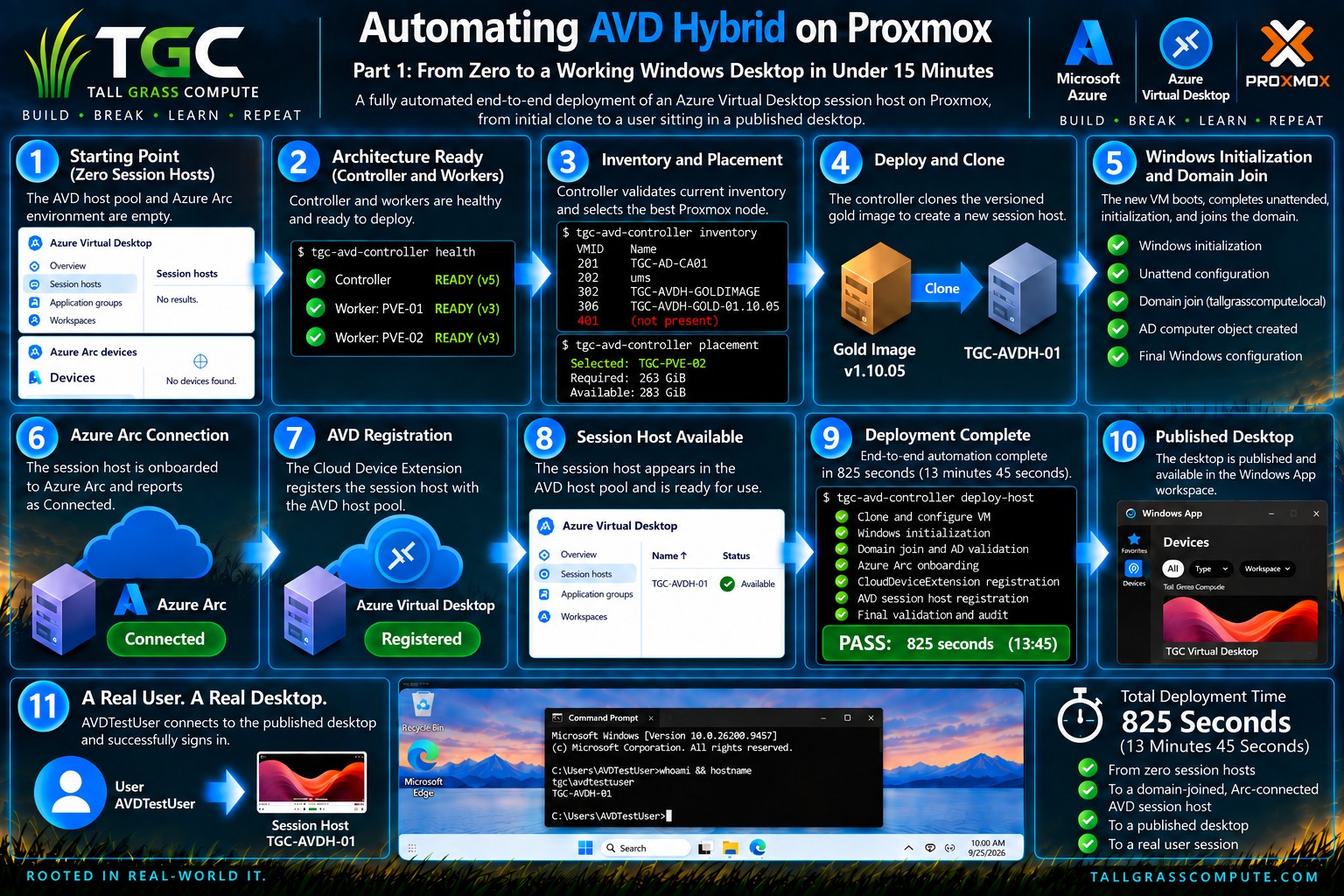
The Experiment
Microsoft’s Azure Virtual Desktop Hybrid changes an important assumption about Azure Virtual Desktop: the session host no longer has to live in Azure. The Azure Virtual Desktop service remains cloud-managed, while Windows desktops and applications can run on existing on-premises infrastructure. Microsoft uses Azure Arc to connect those machines to Azure, and the Azure Virtual Desktop Arc extension installs the AVD components and registers the machine with a host pool. Just as important for this project, Microsoft explicitly leaves virtual- machine provisioning and power-state management to the organization. [1][2]
That boundary is exactly where this Tall Grass Compute experiment begins.
The goal was not merely to prove that a Windows VM running on Proxmox could be attached to Azure Virtual Desktop Hybrid. That had already been demonstrated manually. The harder question was whether the entire on- premises session-host lifecycle could be treated as an engineered platform: select the correct Proxmox node, clone a known deployment image, initialize Windows, join Active Directory, validate the machine, connect it to Azure Arc, install the AVD Arc extension, wait for the host to become Available, and then prove that a real user could sign in.
For Part 1, the lab was deliberately reset to zero deployed AVD Hybrid session hosts. The automation then had to create one from scratch. No pre-existing session host was allowed to hide a missing step.
Why Azure Virtual Desktop Hybrid Matters
Azure Virtual Desktop Hybrid became generally available in September 2026. Microsoft describes it as an extension of Azure Virtual Desktop to existing on-premises infrastructure, with the Azure Virtual Desktop service hosted and managed in Azure while the organization controls the on-premises session hosts, networking, and hosting infrastructure. Microsoft also states that organizations can use their preferred on-premises hypervisor as long as it supports the required Windows virtual machines. [1][2][3]
There is a crucial operational detail behind that flexibility: Azure Virtual Desktop Hybrid does not provision or manage the state of the on-premises VM. Features such as power management, Autoscale, Start VM on Connect, and Session Host Configuration are not provided for these Hybrid hosts. Microsoft specifically says organizations are responsible for deploying and managing those session hosts with hypervisor tools, scripts, partner solutions, or other tooling. [2]
That is not a limitation to work around so much as an architectural boundary to design for. Azure provides the desktop control plane. Azure Arc provides the bridge. The hypervisor remains yours. The lifecycle automation is yours too.
For Tall Grass Compute, that meant Proxmox VE could remain the virtualization platform while Azure Virtual Desktop continued to provide the user-facing desktop service.
The Tall Grass Compute Foundation
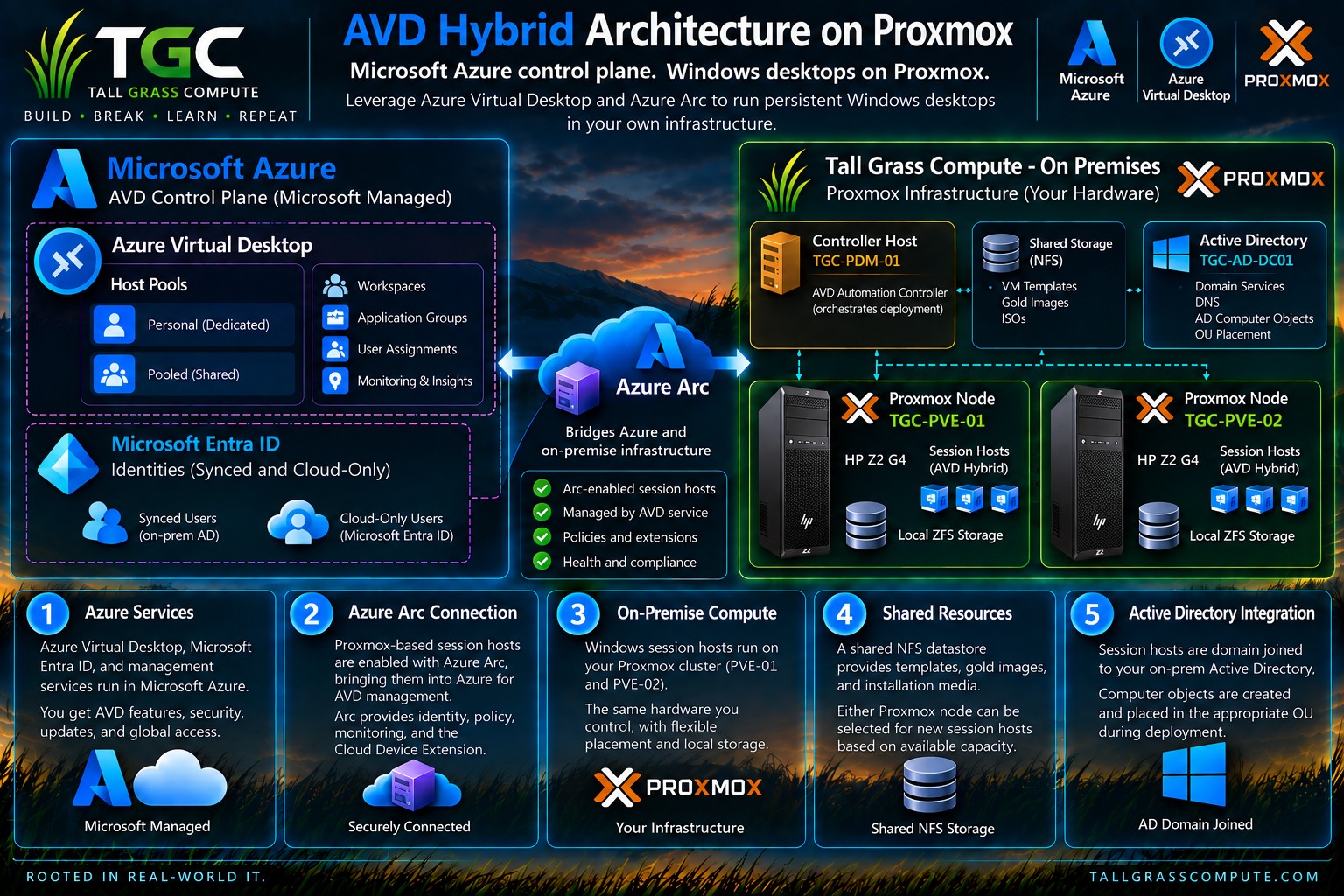
The on-premises side of the lab is intentionally modest. Two HP Z2 G4 tower workstations run Proxmox VE as TGC-PVE-01 and TGC-PVE-02. A Mac mini named TGC-PDM-01 runs Proxmox Datacenter Manager and also hosts the AVD automation controller. A second Mac mini provides Proxmox Backup Server. Active Directory, shared NFS deployment storage, and the rest of the TGC infrastructure support the environment.
This is not an attempt to imitate a large enterprise datacenter with enterprise hardware. It is a deliberately constrained engineering lab. That makes the automation more interesting: the design has to understand storage capacity, node placement, image state, Windows readiness, and cloud registration rather than assuming unlimited resources.
The Azure side contains the AVD host pool, workspace and application group, Microsoft Entra ID, and Azure Arc. For this Part 1 deployment, the Windows session host is domain joined and the test user is a synchronized hybrid identity.
A Two-Image Strategy: Maintain One, Deploy Another
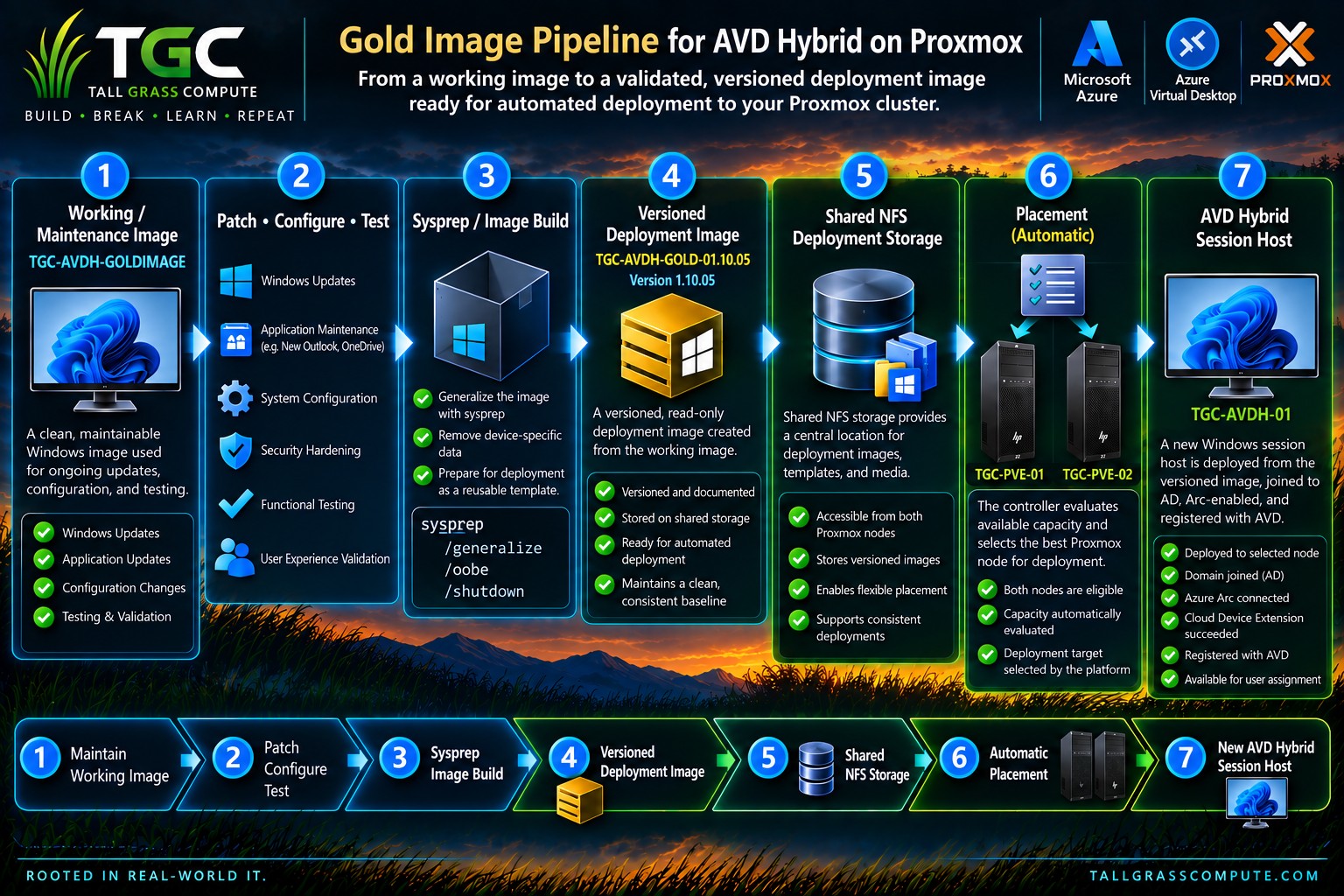
A repeatable deployment starts with a repeatable image. The TGC design separates the image that administrators maintain from the image that automation deploys.
TGC-AVDH-GOLDIMAGE is the working maintenance image. It is bootable and intentionally remains a normal Windows VM. Patches, application changes, configuration changes, and validation happen there. It is not the object cloned directly into production-style session hosts.
When the working image is ready, the image-build process creates a versioned deployment image. For this run, that artifact was TGC-AVDH-GOLD-01.10.05, version 1.10.05. The deployment image is generalized with Sysprep and stored as a Proxmox template. Its virtual disk resides on shared NFS deployment storage, allowing either Proxmox node to use it as the source for a new session host.
That distinction solves two problems. First, it keeps routine maintenance separate from the immutable deployment artifact. Second, it gives the controller a known, versioned source whose state does not change halfway through a deployment.
From Scripts to a Controller/Worker Platform
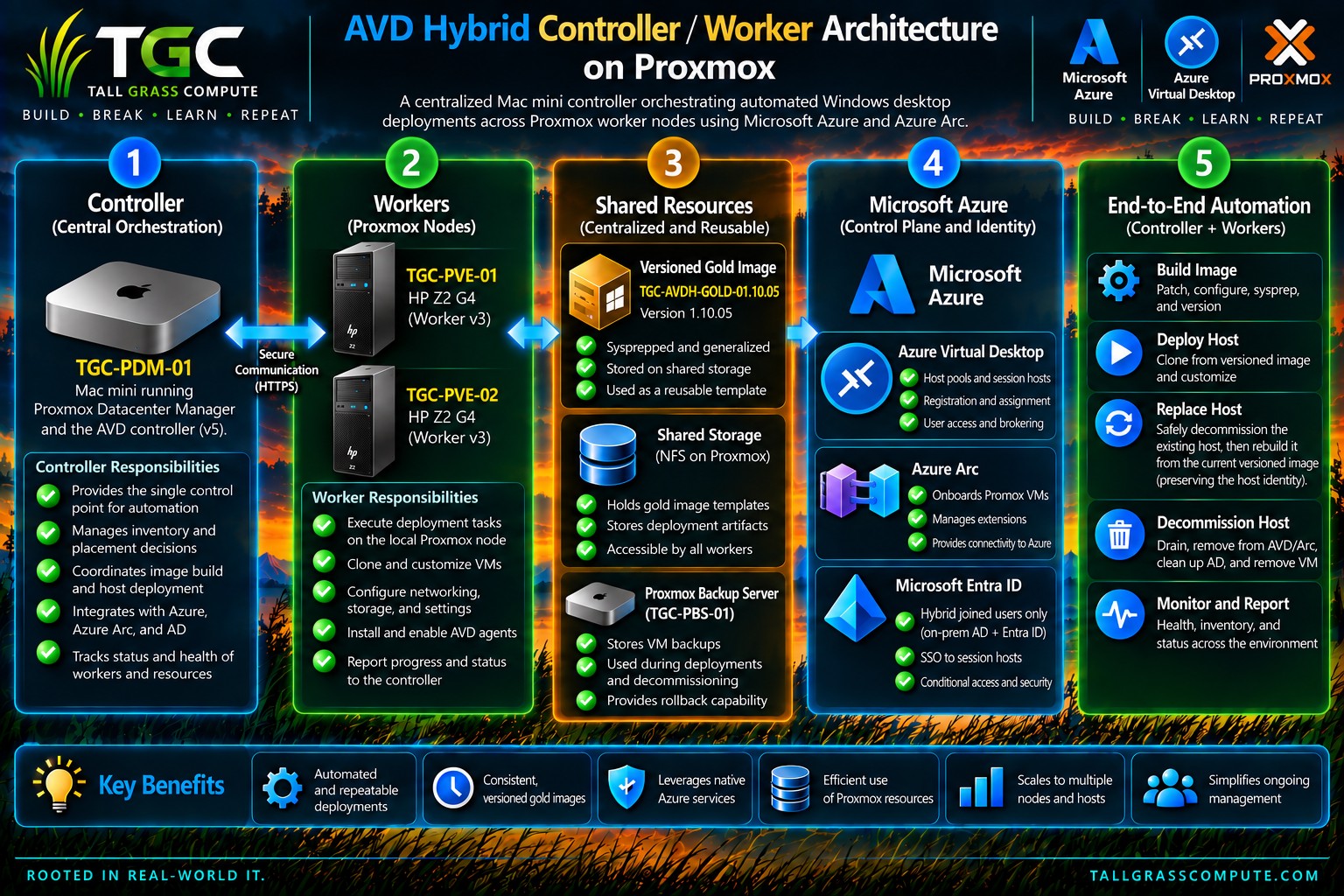
The automation evolved beyond a collection of independent shell scripts. TGC-PDM-01 acts as the controller. Each Proxmox node exposes a constrained worker path used by the controller for node-local operations. The controller owns the workflow and state transitions; workers perform the hypervisor-side actions assigned to them.
This separation is important. The controller can reason about the whole deployment — inventory, placement, Windows state, Azure Arc state, and AVD state — without requiring the Proxmox hosts themselves to own Azure credentials or the complete orchestration logic.
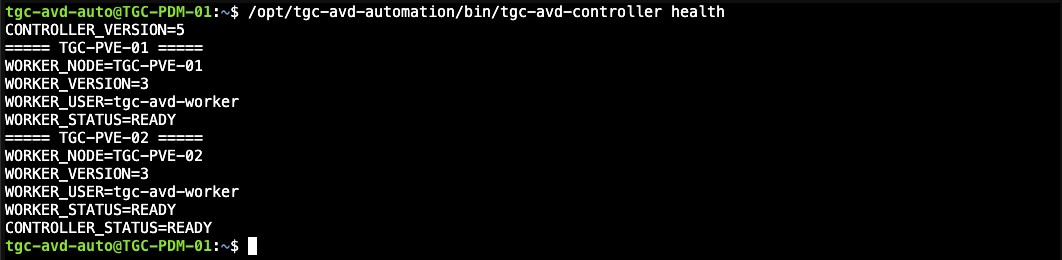
Before the official run, the controller reported version 5 and both workers reported version 3 with READY status. That health check was part of the zero-state evidence, not an assumption.
Establishing a Real Zero State
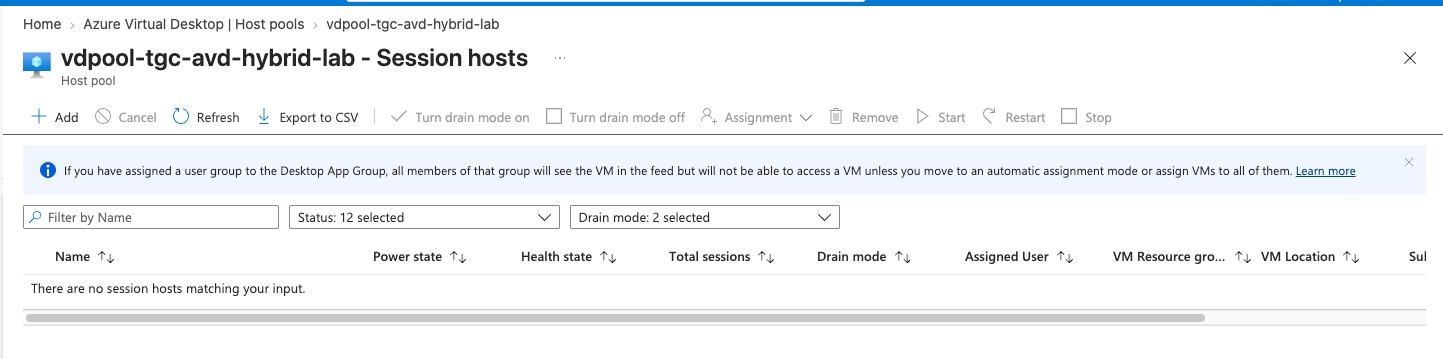
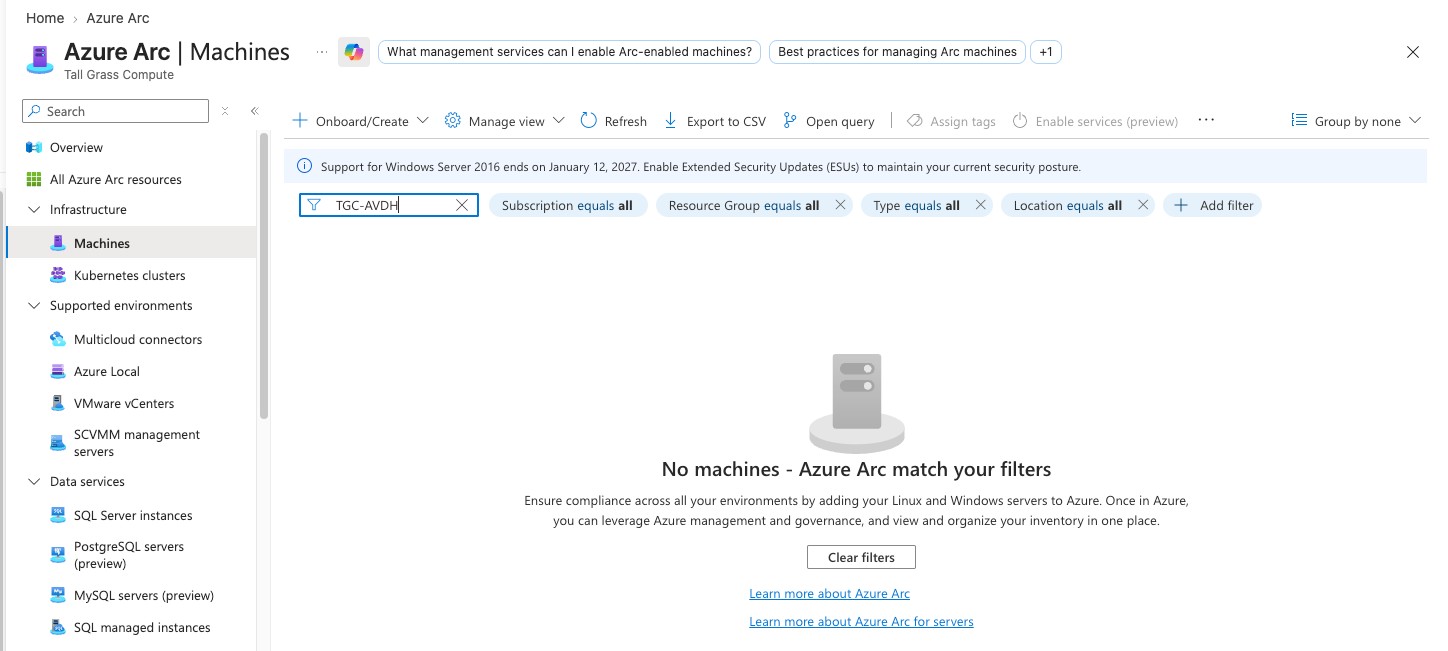
A clean test needed a clean starting point. Three earlier experimental session hosts were decommissioned through the lifecycle automation. Each host was drained, verified to have zero sessions, backed up to Proxmox Backup Server, removed from Azure Virtual Desktop, removed from Azure Arc, removed from Active Directory, shut down, and destroyed in Proxmox.
After cleanup, the AVD host pool contained no session hosts. Azure Arc contained no TGC-AVDH machines. The Active Directory Session Hosts OU was empty. Proxmox inventory contained only infrastructure systems, the working image, and the versioned deployment template.
This matters because “automation works” means something very different when a half-configured machine, stale Arc resource, old AD computer object, or existing AVD registration is still present. The zero-state screenshots became the baseline against which the deployment could be measured.

Placement Is a Decision, Not a Hard-Coded Node
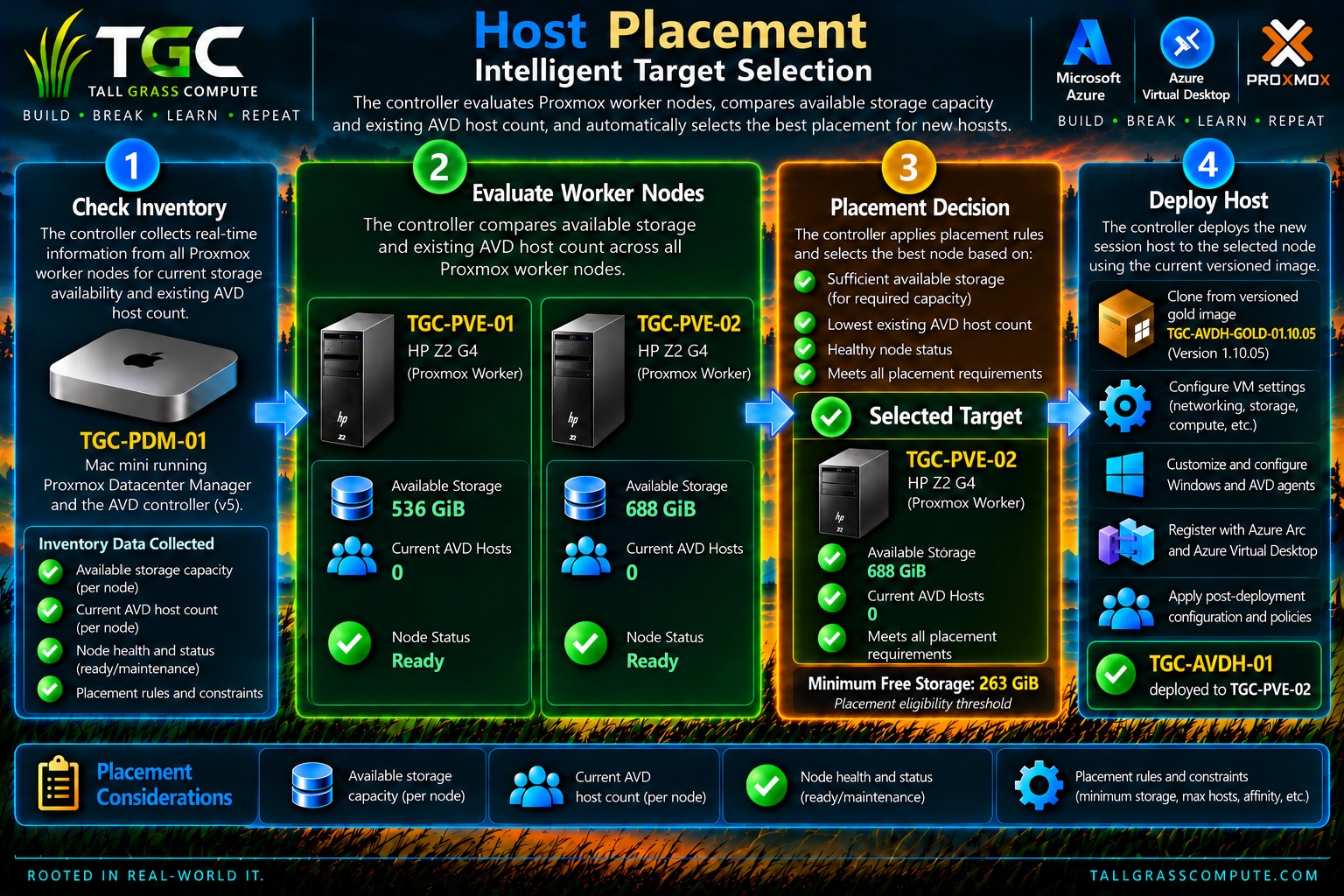
The controller does not blindly deploy to TGC-PVE-01 or TGC-PVE-02. It first evaluates whether a node is eligible, then selects among eligible nodes.
The storage guardrail uses the available space on the local zfs-vm storage. In the current controller configuration, the estimated full-clone requirement is 140 GiB and the node must also retain a reserve equal to 15 percent of the storage pool’s total capacity. For this lab, that calculation produced a placement eligibility threshold of 263 GiB of free space.
The name shown by the controller during engineering work — REQUIRED_GIB — can be misleading if read without context. It is not the size of the new session host. It is the minimum free storage the target Proxmox node must have to be considered eligible for placement.
Once capacity eligibility is satisfied, the controller prefers the node with the fewest existing TGC AVD session hosts. If the host count is tied, the node with more available storage wins. A forced node can also be honored when explicitly configured, but only if it passes the eligibility check.
During the official run, both nodes had zero AVD hosts and both exceeded the 263 GiB threshold. TGC-PVE-01 reported 536 GiB available; TGC-PVE-02 reported 688 GiB. With host counts tied, storage became the tiebreaker and TGC-PVE-02 was selected.
The Official 0 → 1 Deployment
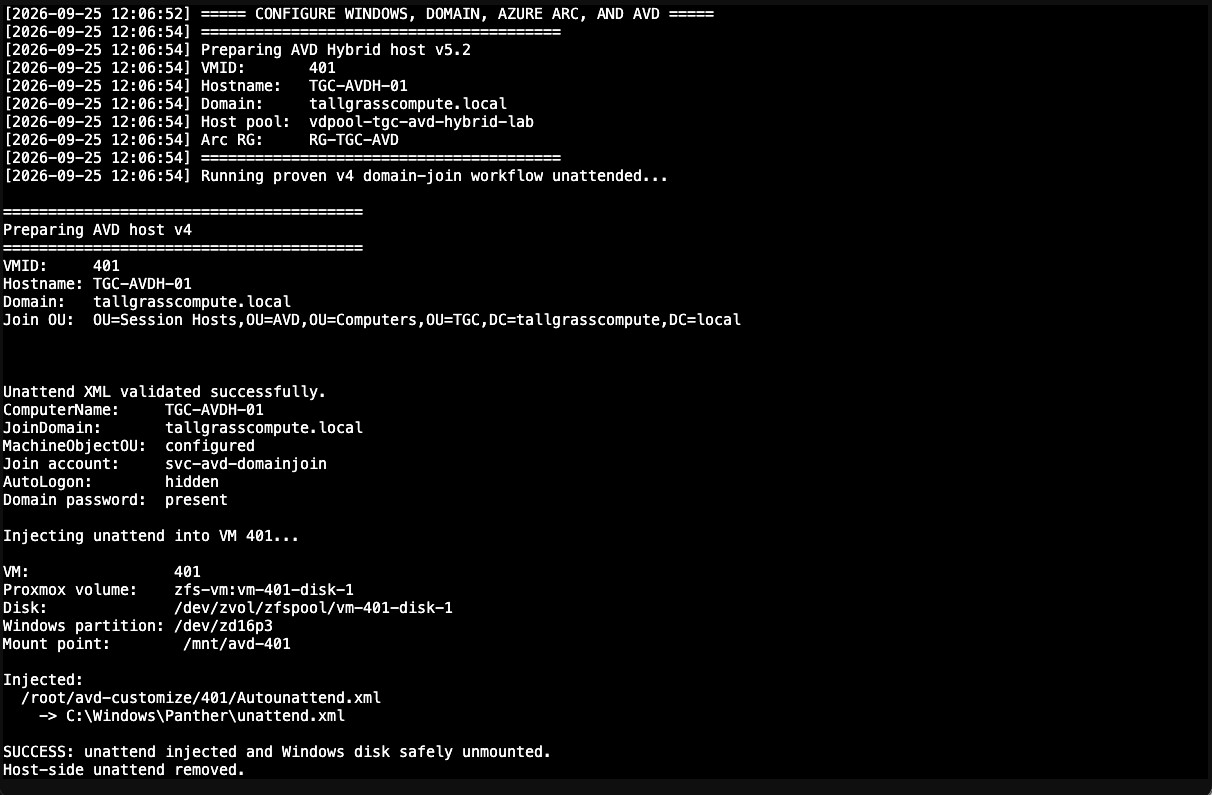
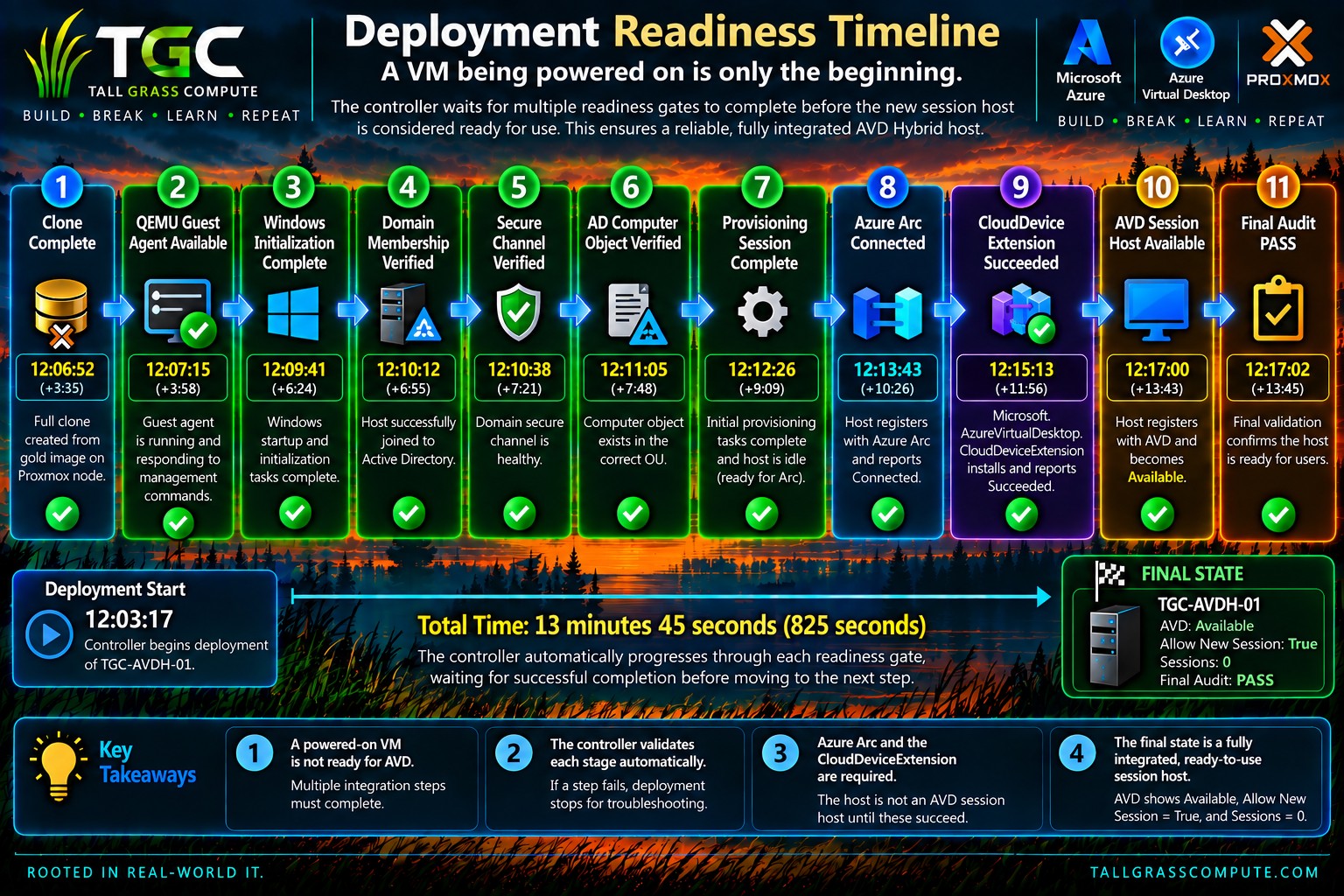
At 12:03:17, the controller began the official deployment of TGC-AVDH-01 from the versioned 1.10.05 deployment image. The goal was deliberately simple to state and difficult to fake: begin with no AVD Hybrid session hosts and end with one usable desktop.

The Proxmox clone completed at 12:06:52. From that point forward, the interesting work was no longer “create a VM.” It was proving that the VM had become the correct Windows computer and was ready to participate in the rest of the platform.
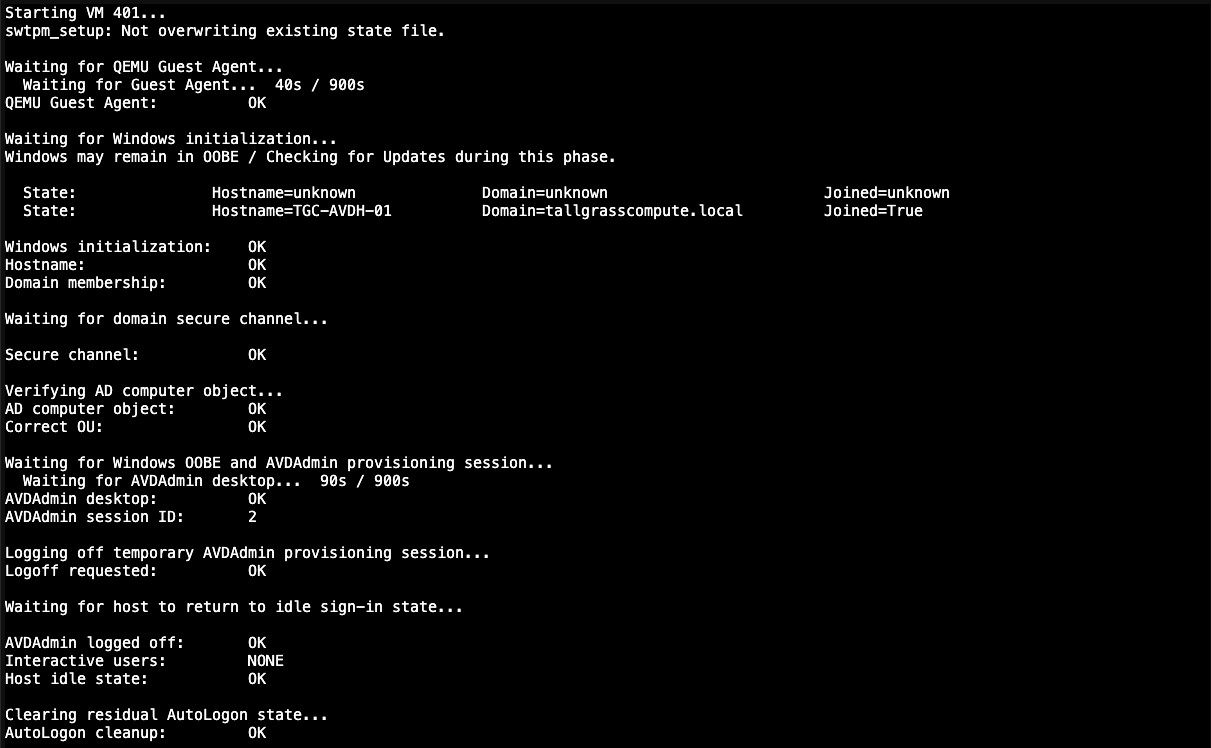
The controller waited for QEMU Guest Agent communication, then observed Windows initialization and the expected computer identity. It verified domain membership, the domain secure channel, the Active Directory computer object and OU placement, completion of the provisioning session, and an idle state suitable for moving on to cloud onboarding.
Only after the base Windows host passed those gates did the controller begin Azure Arc onboarding.

With the clone complete, the controller continued through Windows initialization and domain validation before beginning the cloud-integration stages.
Azure Arc Is the Bridge
Azure Arc-enabled servers gives machines outside Azure an Azure resource identity. Microsoft describes Arc- enabled servers as a way to manage Windows and Linux physical or virtual machines hosted outside Azure, with each connected machine represented as a resource in Azure. The Connected Machine agent is the mechanism that establishes that relationship. [4]
Azure Virtual Desktop Hybrid builds directly on that foundation. Microsoft’s documented Hybrid workflow is: deploy the on-premises Windows machine, connect it to Azure Arc, run the Azure Virtual Desktop Arc extension, and then let users connect through Windows App as they would to another AVD session host. [2]
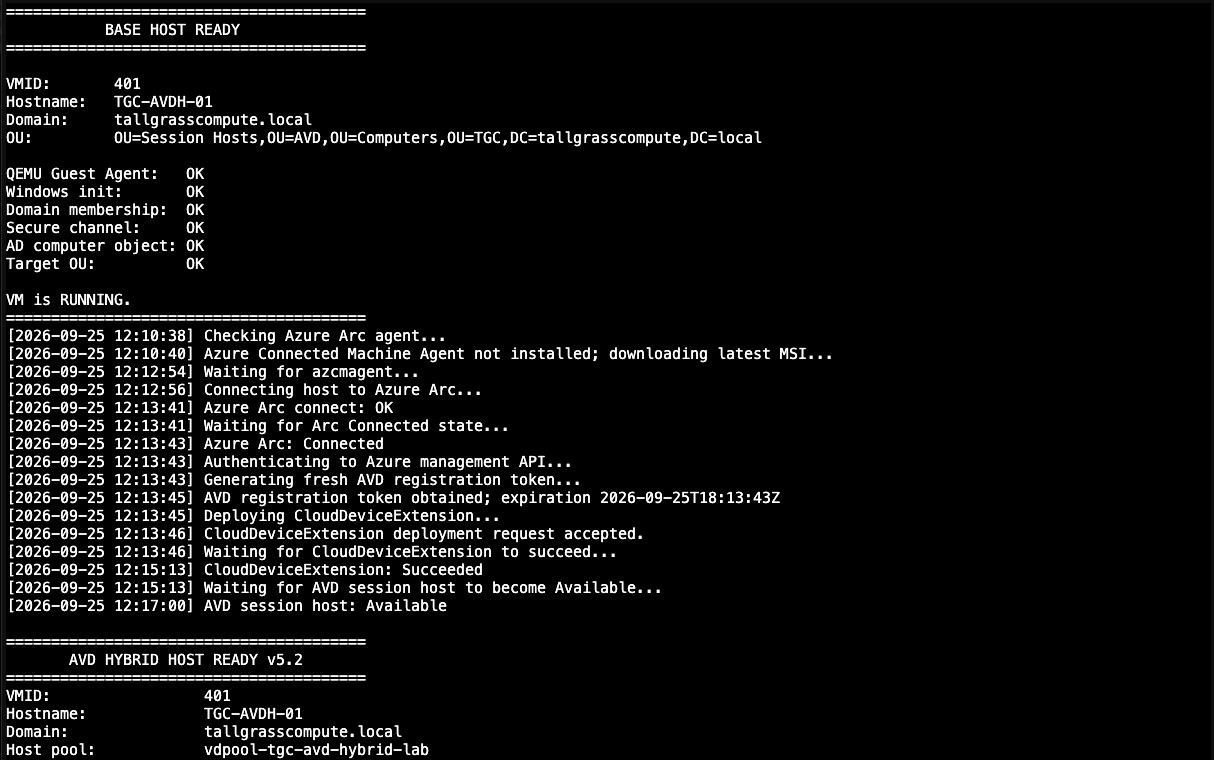
In the TGC run, the controller detected that the Arc agent was not yet installed, installed it, initiated the Arc connection, and then waited for Azure to report the machine Connected. That state was reached at 12:13:43.
Connected to Arc was necessary, but it was not the finish line.
From Arc-Connected Machine to AVD Session Host
The next gate was the Microsoft.AzureVirtualDesktop.CloudDeviceExtension extension. Azure Arc supports VM extensions on Arc-enabled servers, allowing Azure-managed software components to be deployed to hybrid machines. [5] For Azure Virtual Desktop Hybrid specifically, Microsoft documents that the AVD Arc extension installs the AVD software and registers the machine with the Azure Virtual Desktop host pool. [2]
The controller submitted the extension deployment and then waited for Azure to report Succeeded. That occurred at 12:15:13.
Again, the controller did not equate a successful extension deployment with a usable desktop. It moved to the AVD control plane and waited for the new session host to appear in the host pool with status Available.
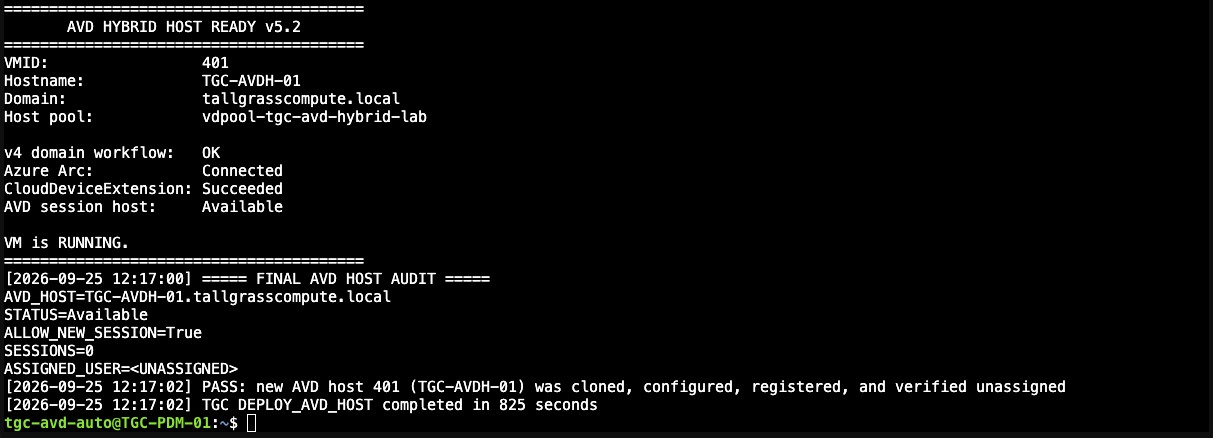
At 12:17:00, TGC-AVDH-01 became Available. At 12:17:02, the final audit passed.
A Powered-On VM Is Not a Ready AVD Host
One of the most important design lessons from this work is that VM power state is a poor definition of readiness.
A VM can be running while the guest agent is unavailable. The guest agent can be responding while Windows is still initializing. Windows can be initialized while the domain secure channel is not healthy. The domain can be healthy while the Arc resource does not yet exist. Arc can be Connected while the AVD extension is still deploying. The extension can report success before the AVD host pool reports the session host Available.
The TGC controller therefore treats deployment as a sequence of observable readiness gates rather than a sequence of commands separated by arbitrary sleep timers. Each gate has to become true before the next stage can proceed.
This approach also makes failure more useful. If a deployment stops, the last successful state tells the operator where the system actually got to. “Script failed after nine minutes” is weak diagnostic information. “Arc Connected, CloudDeviceExtension still not Succeeded” is actionable.
The 825-Second Result
The measured controller runtime was 825 seconds: 13 minutes 45 seconds from deployment start to final audit PASS.
That number is useful, but it should not be mistaken for a universal Azure Virtual Desktop Hybrid benchmark. It is the measured result from this TGC lab, on this hardware, with this image, network, storage, Azure response time, and controller implementation. Another environment could be faster or slower.
The more important result is what happened inside those 825 seconds:
- the controller discovered the environment rather than assuming a target node;
- placement was selected from current capacity and host-count state;
- the session host was cloned from a versioned deployment image;
- Windows initialization and domain health were verified;
- Azure Arc was installed and verified Connected;
- the AVD Arc extension was deployed and verified Succeeded;
- the session host was verified Available in Azure Virtual Desktop; and
- a final audit confirmed that the resulting host was accepting new sessions and had no active sessions.
The automation ended at a platform state, not merely at the end of a command.
Independent Validation After Automation
After the controller completed, the environment was checked from each management plane.
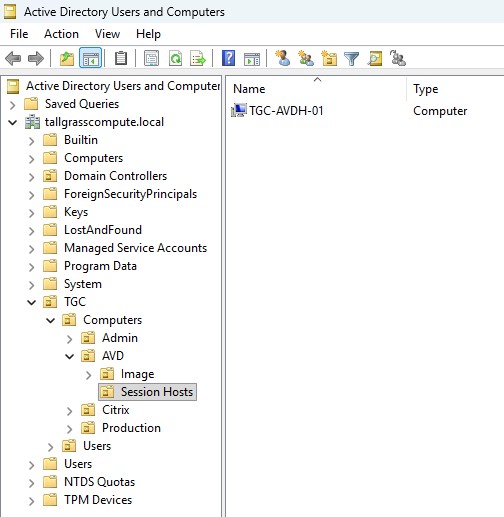
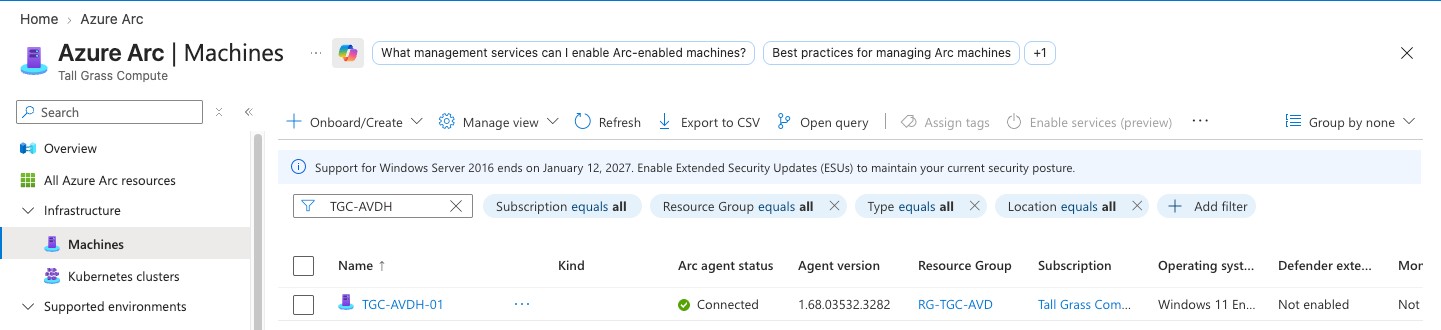
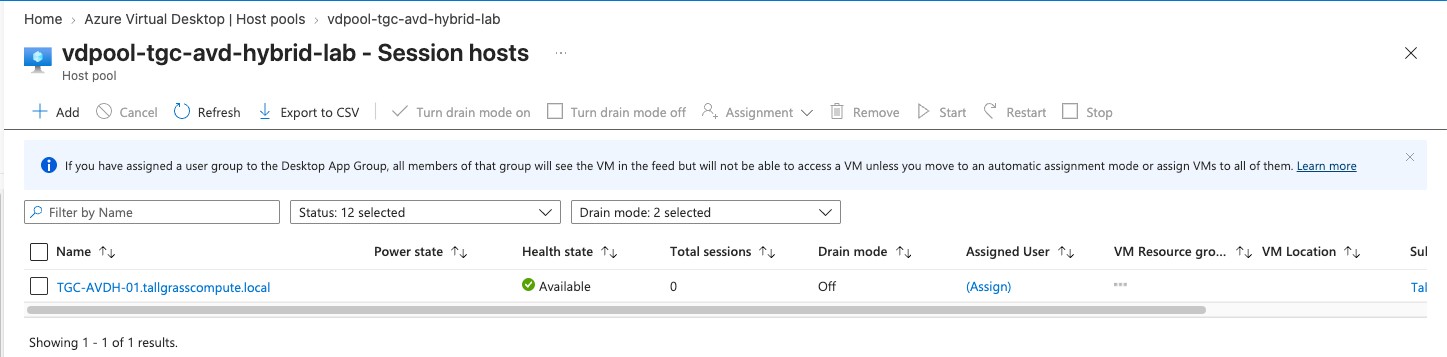
Proxmox showed TGC-AVDH-01 running on TGC-PVE-02. Active Directory showed the computer object in the expected Session Hosts OU. Azure Arc showed one connected TGC-AVDH-01 machine. Azure Virtual Desktop showed one session host, TGC-AVDH-01.tallgrasscompute.local, with status Available and drain mode off.
These checks are intentionally redundant. A single green status in one console is not enough to prove an end-to- end hybrid system.
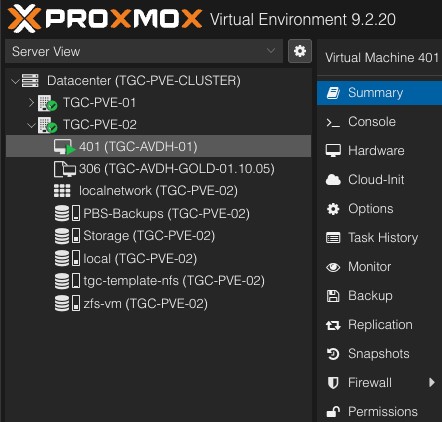
The remaining management planes told the same story: the computer object, Arc resource, and AVD session- host record all reflected the newly deployed host.
The Final Test: Put a User in the Desktop
Infrastructure validation is necessary, but the product being delivered is a desktop.
The TGC host pool is personal/dedicated, so the test user was assigned to the desktop after the automated host build. The account used for the final validation was AVDTestUser, a synchronized hybrid identity. After the required Microsoft Entra security-information registration was completed, Windows App presented the Tall Grass Compute workspace and the published TGC Virtual Desktop.
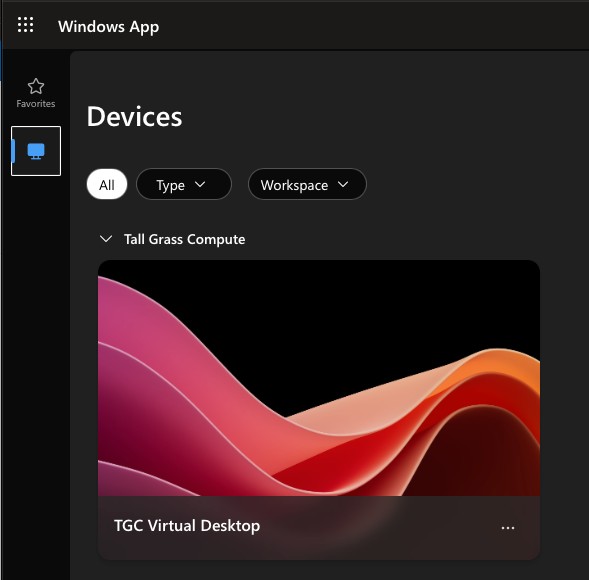
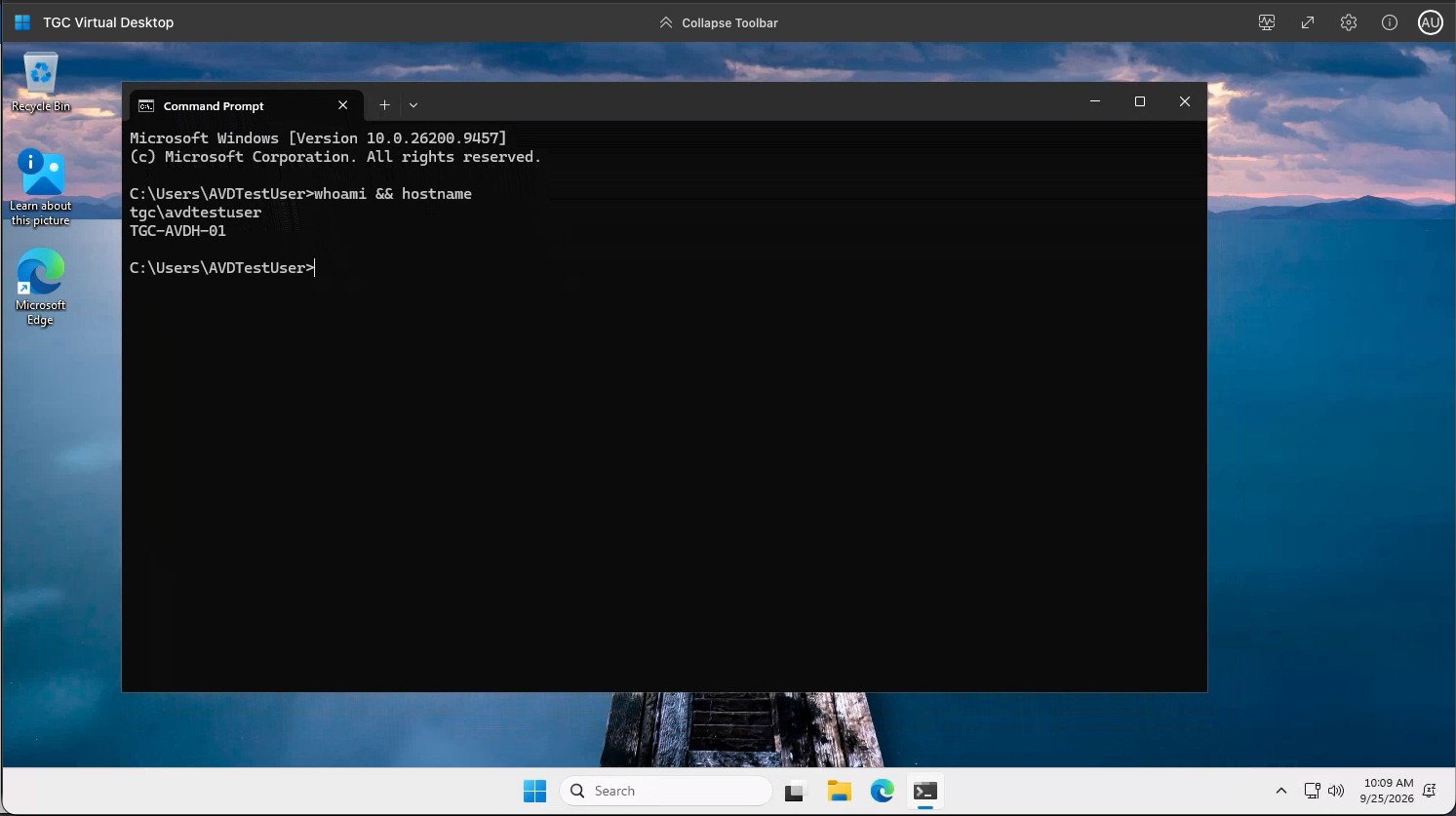
The final validation was the simplest and most important one: could the assigned user actually reach the published Windows desktop? The screenshot below provides that end-to-end proof. This closes the loop: the automated deployment progressed from zero session hosts to a working Azure Virtual Desktop Hybrid desktop that a real user could access.
What Part 1 Proved
Part 1 began with a deliberately empty AVD Hybrid host pool and ended with a usable Windows desktop running on Proxmox.
Microsoft provides the Azure Virtual Desktop service, Azure Arc integration, and the extension that turns an Arc- enabled Windows machine into an AVD Hybrid session host. The customer remains responsible for the on- premises machine lifecycle. [2] In the TGC lab, that lifecycle boundary became the automation platform.
The experiment demonstrated that the missing lifecycle can be made deterministic enough to automate: image selection, placement, cloning, Windows initialization, domain validation, Arc onboarding, AVD extension deployment, host-pool readiness, and final auditing can all be treated as states that are observed and verified.
The result is not “AVD running on Proxmox” as a novelty. The more useful result is an architecture in which Azure and Proxmox each do what they are good at, with a controller providing the lifecycle glue between them.
What Comes Next: Part 2
Building a host once is only half of the engineering problem.
The next question is what happens when the working gold image needs its monthly maintenance and the deployed host needs to be replaced without losing control of the lifecycle.
Part 2 will start with the host created in this article still running and assigned to AVDTestUser. The working image will be patched and validated. A new versioned deployment image will be created. The existing TGC-AVDH-01 will be drained and safely decommissioned. A replacement will then be built from the new image, reusing the host identity, and the test user will connect again.
That is the next TGC cycle:
BUILD • BREAK • LEARN • REPEAT.
References and Further Reading
1. What is Azure Virtual Desktop? — Microsoft Learn
2. Azure Virtual Desktop Hybrid Overview — Microsoft Learn
3. What's new in Azure Virtual Desktop — Microsoft Learn
4. Azure Arc-enabled servers overview — Microsoft Learn
5. Enable VM extensions on Azure Arc-enabled servers — Microsoft Learn
6. Prerequisites for Azure Virtual Desktop — Microsoft Learn
7. Azure Virtual Desktop identities and authentication — Microsoft Learn
8. Azure Virtual Desktop documentation — Microsoft Learn
9. Proxmox VE Administration Guide — Proxmox
Tall Grass Compute • tallgrasscompute.com
Comments
Questions, feedback, or something you tried differently? Leave a comment below.